


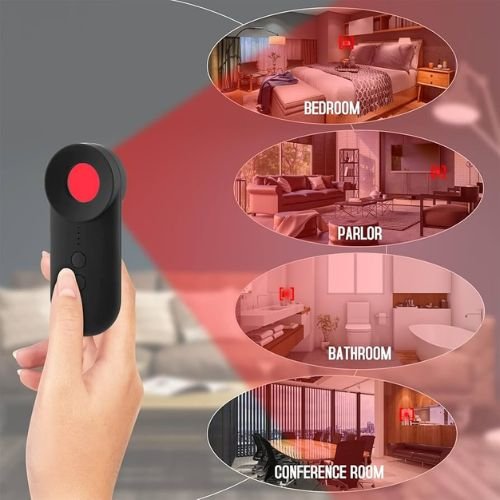
- Check bathrooms, bedrooms, changing areas
- Inspect vents, smoke detectors, mirrors
- Scan WiFi network for unknown devices
- Use phone camera to detect lenses
- Look for unusual holes or lights
Where Can I Search for Hidden Cameras? With the rise of small and affordable spy devices, hidden cameras have become a real concern. People often worry about privacy when staying in hotels, rental homes, changing rooms, or even public spaces.
Hidden cameras are designed to be discreet. They can be placed in everyday objects and are often difficult to notice at first glance. That is why knowing where and how to search for hidden cameras is important for your personal safety.
What Are Hidden Cameras?
Hidden cameras are small recording devices used to capture video without being noticed. While they can be used legally in some cases, they are often misused for privacy violations.
They are commonly hidden inside:
- Smoke detectors
- Clocks
- Chargers
- Air purifiers
- Light bulbs
Common Places Hidden Cameras Are Found
When entering a new place, these are the areas you should check first:
Bedrooms
- Near beds
- Facing sleeping areas
Bathrooms
- Behind mirrors
- Inside ventilation areas
Changing Rooms
- Near hooks or shelves
Living Spaces
- Facing sofas or main seating areas
Electronic Devices
- Chargers, routers, or alarm clocks
Signs There Might Be a Hidden Camera
Look for unusual clues:
- Small holes or black dots
- Blinking lights
- Unfamiliar devices
- Wires that seem out of place
- Objects positioned directly toward you
If something feels unusual, trust your instinct.
How to Search for Hidden Cameras (Step-by-Step)
Hidden cameras can be difficult to spot, but simple checks can help protect your privacy. By following step-by-step methods, you can detect suspicious devices and stay safe in unfamiliar places.
1. Turn Off the Lights
A dark room makes it easier to spot reflections.
2. Use a Flashlight
Shine a light across surfaces. Camera lenses reflect light.
3. Inspect Objects Carefully
Check items like clocks, smoke detectors, and chargers.
4. Check WiFi Networks
Look for unknown connected devices.
5. Listen for Sounds
Some cameras make faint buzzing or clicking noises.
Using Your Smartphone to Detect Cameras

Your smartphone can help detect hidden cameras using simple methods like scanning for reflections, infrared signals, and nearby devices. It is a quick way to check your surroundings and protect your privacy.
Camera Detection Trick
- Turn off lights
- Open your phone camera
- Scan the room slowly
Some hidden cameras may show a reflection or light.
Network Scanning Apps
Apps can detect devices connected to the same WiFi network.
Tools That Help Detect Hidden Cameras
You can use:
- RF (radio frequency) detectors
- Lens detectors
- Spy camera detection apps
These tools improve accuracy, especially in unfamiliar places.
What To Do If You Find One
If you discover a hidden camera:
- Do not touch it immediately
- Take photos as evidence
- Leave the area
- Inform authorities or management
- Report the incident
Your safety should always come first.
Detection Method vs Effectiveness
| Detection Method | How It Works | Effectiveness |
|---|---|---|
| Visual Inspection | Checking objects manually | Medium |
| Flashlight Test | Detecting lens reflection | High |
| Phone Camera Scan | Identifying light signals | Medium |
| RF Detector | Detecting wireless signals | High |
Quick Safety Checklist
When entering a new place:
- Check unusual objects
- Scan the room with a flashlight
- Inspect electronic devices
- Look for hidden holes or lenses
- Check WiFi connections
Must Read:
- Do Fitness Trackers Sell Your Data?
- How to Identify a Fake Job Offer?
- How to Identify a Scammer’s Phone Number?
Final Thoughts:
Hidden cameras are a serious privacy concern, but awareness can help you stay safe. Simple checks and careful observation can reduce risks significantly.
Always stay alert in unfamiliar environments. A few minutes of checking can protect your privacy and give you peace of mind.
Your safety and privacy are important. Take control and stay informed.