

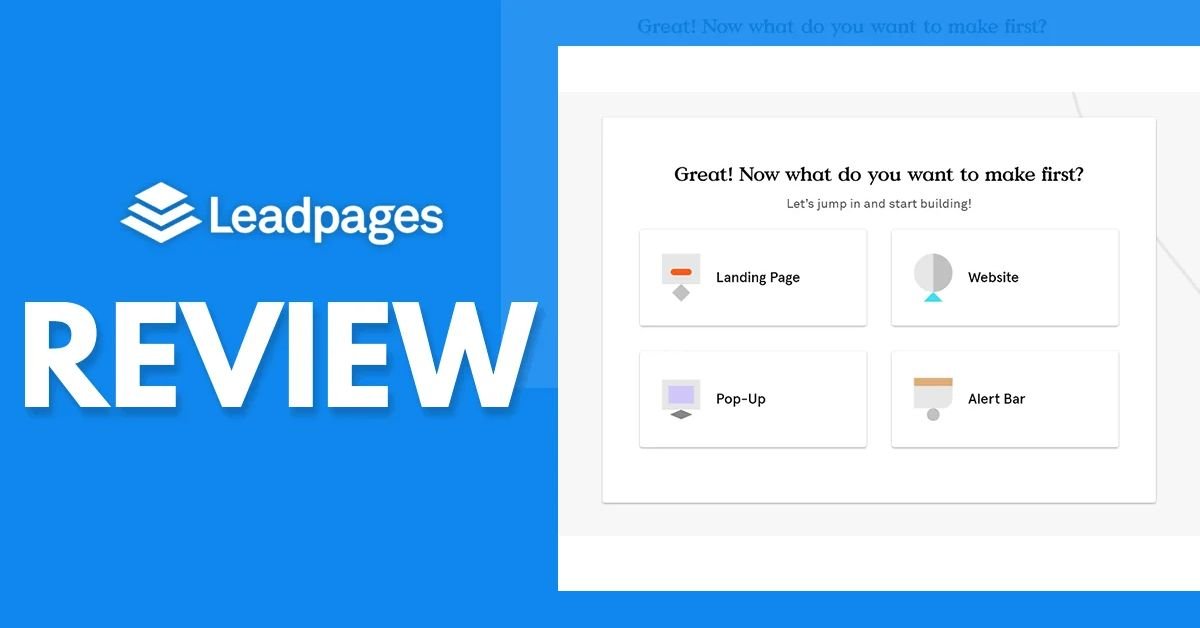

- Create Landing Pages Faster
- Convert More Visitors Easily
- Use AI-Powered Design Tools
- Capture Leads And Grow
Getting visitors to your website is only half the battle. The real challenge is turning those visitors into customers, subscribers, or qualified leads. You might have a successful Google Ads campaign, an attractive offer, and a well-defined target audience, but if your landing page fails to convince visitors, your marketing budget can quickly go to waste. This is where Leadpages AI comes into the picture.
Leadpages AI is designed to simplify landing page creation and help businesses build pages that support lead generation and conversions. Instead of spending hours designing pages, writing marketing copy, and arranging different website elements, marketers can use AI-assisted workflows, customizable templates, and conversion-focused tools to streamline the process.
But can Leadpages AI really improve your conversion rates? Does it offer enough features to make landing page optimization easier? And is it a suitable choice for affiliate marketers, small businesses, agencies, and digital marketing professionals?
In this detailed Leadpages AI review, we will explore its features, landing page creation process, conversion optimization capabilities, benefits, limitations, pricing considerations, and practical use cases. By the end, you will have a clearer idea of whether Leadpages AI deserves a place in your marketing toolkit.
What Is Leadpages AI?
Leadpages AI is associated with the Leadpages landing page creation platform, which helps businesses create marketing pages without requiring advanced coding or web development skills. The platform focuses on helping marketers build pages for lead generation, product promotions, email subscriptions, webinar registrations, and other marketing objectives.
A landing page is a standalone web page designed around a specific goal. Unlike a traditional website homepage, which usually contains multiple navigation options and sections, a landing page encourages visitors to complete one primary action.
For example, an affiliate marketer might create a landing page promoting a software product. A small business could use a landing page to collect customer inquiries, while an online educator might use one to promote a course.
Leadpages AI aims to make this process more convenient through AI-assisted creation and marketing tools. Users can start with a suitable page structure, customize the content, add images and CTA buttons, and prepare their pages for publishing.
The main idea is simple: create better marketing experiences without making landing page development unnecessarily complicated.
Can Leadpages AI Really Improve Your Conversion Rates?
Yes, Leadpages AI can help businesses improve the elements that influence landing page conversions. However, it is important to understand that no landing page builder can guarantee higher conversions automatically.
Your conversion rate depends on several factors, including your offer, audience quality, advertising message, page design, loading speed, pricing, and customer trust.
For example, imagine you are running a Google Ads campaign for an email marketing platform. Your advertisement promises a free trial, but the landing page displays unrelated information and makes visitors search for the registration button.
Even if your advertising campaign attracts relevant visitors, the landing page experience can reduce conversions.
With Leadpages AI, you can build a more focused page that communicates the offer clearly, highlights important benefits, and encourages visitors to take action.
Here are some ways the platform can support conversion improvement:
- Create focused landing pages for specific marketing campaigns.
- Use persuasive headlines and supporting content.
- Add clear call-to-action buttons.
- Build lead capture forms.
- Test different landing page variations.
- Improve the overall visitor experience.
The important point is that Leadpages AI provides tools to support conversion optimization. Your marketing strategy and the quality of your landing page still determine the final results.
Key Features of Leadpages AI
A landing page builder should do more than provide attractive templates. It should help businesses create, manage, and optimize pages according to their marketing goals.
Let's look at the important capabilities associated with Leadpages.
1. AI-Assisted Landing Page Creation
One of the most interesting aspects of Leadpages AI is its AI-assisted approach to creating landing pages.
Traditional page development often requires users to start with a blank layout, write content, select images, and arrange different sections manually. This process can take considerable time, especially when creating multiple campaign pages.
AI-assisted workflows can simplify the starting process by helping users develop page content and structures based on their business requirements.
For example, if you are promoting a digital marketing course, you can prepare a description explaining the course, its target audience, and its main benefits. AI assistance can help you develop suitable marketing content and organize your initial page structure.
You can then review and customize the content to ensure it accurately represents your offer.
2. Drag-and-Drop Landing Page Editor
A visual page editor is important for users who do not have coding experience.
Leadpages provides page editing capabilities that allow users to customize different elements of their landing pages. You can work with text, images, buttons, sections, and other design elements to create a page that matches your brand.
For example, you can change the headline, update product images, modify button text, and adjust the overall layout.
This flexibility is useful for affiliate marketers and business owners who want to create professional pages without hiring a developer for every small change.
3. Professional Landing Page Templates
Designing every landing page from scratch can become difficult when managing several advertising campaigns.
Leadpages AI users can benefit from Leadpages' template-based approach to page creation. Templates provide a starting structure for different marketing objectives.
You can use landing page layouts for:
- Lead generation campaigns.
- Product promotions.
- Webinar registrations.
- Email subscriptions.
- Service inquiries.
- Sales and promotional campaigns.
Templates can help reduce design time and maintain a consistent visual appearance across marketing pages.
However, choosing a template should depend on your campaign objective rather than appearance alone.
4. A/B Testing for Better Performance
A/B testing is one of the most useful techniques for improving landing page conversion rates.
It involves creating two or more versions of a page and comparing their performance using a defined conversion goal.
For example, you could test two different headlines:
- Version A: Build Your Website Without Coding.
- Version B: Launch Your Professional Website Faster.
Both headlines communicate a similar offer, but their performance may differ depending on your audience.
Leadpages offers A/B testing capabilities on supported plans, allowing marketers to compare page variations and make decisions using campaign performance data.
You can experiment with headlines, images, CTA buttons, and page layouts to identify which elements work better.
The goal is not to make random design changes. It is to understand visitor behavior and improve the page based on measurable results.
5. Smart Traffic Optimization
Another conversion-focused capability associated with Leadpages is Smart Traffic.
Smart Traffic is designed to help direct visitors toward landing page variations that are more likely to perform well for different audiences.
This can be useful when you are running campaigns targeting multiple customer segments.
For example, visitors interested in small business software may respond differently to a landing page than visitors looking for enterprise solutions.
Instead of relying entirely on one page design, marketers can explore different page variations and use optimization tools to improve the visitor experience.
Availability and functionality depend on the applicable Leadpages plan.
6. Lead Generation Forms
Collecting customer information is an important part of many online marketing campaigns.
Leadpages AI can support lead generation workflows through landing pages and form-based conversion experiences.
You can create pages that encourage visitors to submit their names, email addresses, and other relevant information.
For example, an online business could offer a free downloadable guide in exchange for an email subscription.
A consultant might create a landing page where visitors can request a consultation.
These forms provide a practical way to turn website traffic into potential business opportunities.
7. Marketing Integrations
Businesses often use several marketing platforms to manage their campaigns.
A landing page builder should work with the tools you already use for email marketing, customer management, analytics, and advertising.
Leadpages supports integrations with various third-party services. Depending on the integration and configuration, these connections can help transfer lead information and support marketing workflows.
Before choosing a plan, check the current integration directory to confirm that your preferred tools are supported.
This is particularly important for agencies and affiliate marketers managing several campaigns simultaneously.
8. Mobile-Friendly Landing Pages
Mobile responsiveness is essential for modern landing pages.
Many visitors access advertising campaigns through smartphones, so your page should display correctly on smaller screens.
A good mobile landing page should have readable headlines, properly sized images, accessible buttons, and easy-to-use forms.
With Leadpages' page-building tools, users can create and review landing pages for different screen sizes.
Before publishing, always test your page on mobile devices to ensure that the visitor experience remains smooth.

How Leadpages AI Helps Reduce Wasted Advertising Spend
One of the biggest problems in digital advertising is sending paid traffic to landing pages that do not match the advertisement.
Imagine running 40 Google Ads ad groups, each targeting a different keyword or customer requirement. Sending all visitors to the same generic landing page may reduce relevance and make it harder for visitors to find the information they expect.
Leadpages AI can help address this challenge by making it easier to create different landing page variations for specific campaigns.
1. Create Campaign-Specific Landing Pages
You can develop separate landing pages for different products, services, audiences, and advertising campaigns.
For example, a web hosting company could create dedicated pages for WordPress hosting, cloud hosting, and reseller hosting.
Each page can feature relevant headlines, benefits, images, and CTAs. This creates a more consistent experience between the advertisement and the landing page.
2. Improve Message Match With Dynamic Text
Dynamic Text Replacement is another useful feature for paid advertising campaigns.
It allows supported landing page text to match information from advertising campaigns through URL parameters. This can help create a more relevant experience for visitors arriving from different advertisements. Leadpages
For example, someone clicking an advertisement for affordable web hosting could see a headline that reflects that specific search interest.
3. Avoid Traffic-Based Overages
Advertising costs can increase when campaigns generate more visitors. Some landing page platforms also charge based on traffic limits.
Leadpages states that its plans do not impose visitor traffic caps or traffic-based overage fees. This can make budgeting more predictable for businesses running large advertising campaigns. Leadpages – Leadpages+1
However, remember that your advertising budget, hosting requirements, and other marketing expenses still need to be managed separately.
Leadpages AI Pricing: Is It Worth the Investment?
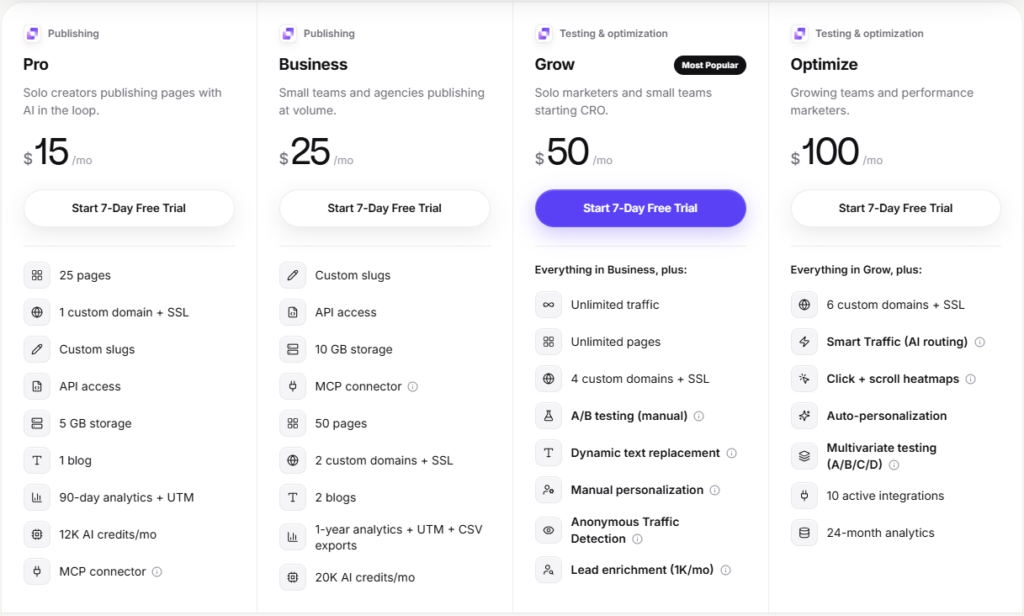
Pricing is an important consideration when selecting a landing page builder. You should compare subscription costs with the features you actually need for your marketing campaigns.
According to Leadpages' published pricing information, its three main plans are Grow, Optimize, and Scale. Leadpages Knowledge Base+1
Grow
$99/month
Or $79/month when billed annually
Suitable for individuals and small businesses getting started with landing page optimization.
- Landing page creation
- A/B testing
- Built-in analytics
- AI credits
Optimize
$199/month
Or $159/month when billed annually
Suitable for marketers and growing businesses that need more advanced optimization.
- Everything in Grow
- Smart Traffic
- Heatmaps
- Smart personalization
- Additional integrations
Scale
$399/month
Or $319/month when billed annually
Suitable for agencies and larger marketing teams.
- Advanced A/B testing
- Automated optimization
- More team seats
- Extended analytics retention
- Advanced optimization features
Prices are based on published plan information and may change. Check the official pricing page before purchasing.
Which Leadpages Plan Should You Choose?
The Grow plan may be sufficient if you are a freelancer, solo marketer, or small business owner who needs landing page creation, analytics, and A/B testing.
The Optimize plan is worth considering if you run regular paid advertising campaigns and want additional capabilities such as Smart Traffic and heatmaps.
The Scale plan is more appropriate for agencies and businesses managing multiple brands, websites, and marketing teams.
My recommendation is to start by identifying your monthly traffic, number of campaigns, testing requirements, and team size. Choose a plan based on your actual needs rather than paying for features you may never use.
Leadpages AI Pros and Cons
Every landing page builder has strengths and limitations. Before investing in Leadpages AI, consider the following advantages and potential drawbacks.
Pros of Leadpages AI
Easy Page Creation: AI-assisted workflows and ready-made templates help simplify landing page development.
No Coding Required: The visual editor makes it easier for beginners and marketers to customize pages without writing code.
Conversion Optimization: A/B testing, Smart Traffic, and other optimization capabilities help marketers improve page performance.
Lead Generation: Forms and landing page elements support email collection, registrations, and customer inquiries.
Built-In Analytics: Performance information helps users understand traffic, conversions, and visitor behavior.
No Traffic-Based Fees: Leadpages advertises unlimited visitor traffic without additional visitor-based overage charges.
Marketing Integrations: Supported third-party integrations help connect landing pages with other marketing services.
Cons of Leadpages AI
Premium Pricing: The published starting price may be expensive for beginners and individuals with limited marketing budgets.
Learning Curve: Users who are new to landing page optimization may need time to understand testing and analytics features.
Plan Restrictions: Some advanced features, including Smart Traffic and heatmaps, require higher-tier subscriptions.
AI Content Requires Editing: AI-generated headlines and marketing copy should always be reviewed for accuracy, clarity, and brand consistency.
Not a Complete Marketing Solution: Leadpages focuses on landing pages and conversion optimization. You may still need separate tools for advertising, email marketing, customer support, and broader website management.
Overall, Leadpages offers a useful combination of landing page creation and optimization tools, but its value depends on how frequently you use these capabilities.
How to Improve Your Conversion Rate With Leadpages AI
Having access to advanced landing page features does not automatically produce better marketing results. You need a clear strategy to use those features effectively.
Here are some practical ways to improve your landing page conversion rate with Leadpages AI.
1. Write Headlines That Match Your Advertisements
Your headline should immediately communicate the offer visitors expect to see.
If someone clicks an advertisement promoting a discount on website hosting, the landing page should clearly highlight that hosting offer.
Avoid generic headlines that do not communicate your product or service.
2. Keep Your Landing Page Focused
Every landing page should have one primary conversion objective.
If your goal is collecting email subscribers, make the subscription offer the main focus. Avoid adding unnecessary links, competing offers, or unrelated information that could distract visitors.
3. Use Clear Call-to-Action Buttons
Your CTA should explain exactly what happens when visitors click it.
For example, use phrases such as “Start Your Free Trial,” “Get Your Discount,” or “Download the Guide.”
Make buttons easy to locate and ensure they work correctly on desktop and mobile devices.
4. Add Trust Elements
Visitors are more likely to consider an offer when they understand why they should trust the business.
You can include genuine customer testimonials, verified ratings, product information, security details, and relevant case studies.
Never use fabricated testimonials or misleading performance claims.
5. Experiment With Different Page Variations
Use A/B testing to compare different headlines, images, CTA buttons, and page structures.
Instead of changing everything at once, test specific elements so you can better understand what influences visitor behavior.
Leadpages provides testing tools that help you measure results and identify stronger page variations. Leadpages – Leadpages+1
6. Monitor Visitor Behavior
Conversion rates tell you how many visitors complete your desired action, but they do not always explain why other visitors leave.
Analytics and heatmaps can provide additional information about visitor interactions, clicks, and scrolling behavior.
Use these insights to identify sections that need improvement and make informed design decisions.
Leadpages AI vs Traditional Landing Page Builders
Traditional landing page builders generally focus on providing templates, editing tools, and publishing capabilities. Users are responsible for arranging page elements, writing content, and making most optimization decisions.
AI-powered landing page builders introduce additional assistance through automated content creation, page generation, design suggestions, and optimization workflows.
Here is a simple comparison:
| Feature | Traditional builders | Leadpages AI |
|---|---|---|
| Page creation | Mostly manual | AI-assisted |
| Content creation | Manually written | AI-assisted |
| Templates | Available | Available |
| Page customization | Visual editing | Visual editing |
| A/B testing | Depends on platform | Available |
| Smart Traffic | Not always available | Available on eligible plans |
| Analytics | Often requires integrations | Built-in analytics |
| Coding skills | Usually not required | Not required for standard page creation |
The biggest advantage of Leadpages AI is the combination of page creation and conversion optimization capabilities. Instead of treating landing page design and testing as completely separate activities, Leadpages brings several important marketing functions together.
Who Should Use Leadpages AI?
Leadpages AI can be useful for different types of businesses and marketing professionals.
Affiliate Marketers
Affiliate marketers can create dedicated promotional pages for software, hosting services, online courses, and other products. Instead of sending visitors directly to an affiliate offer, they can build focused pages that explain product benefits and encourage visitors to click their affiliate links.
Digital Marketing Agencies
Agencies managing multiple advertising campaigns can use Leadpages to create campaign-specific landing pages, test different designs, and monitor conversion performance.
This can help reduce the time spent coordinating landing page development across different clients.
Small Business Owners
Small businesses can create pages for service promotions, appointment requests, email subscriptions, and customer inquiries without depending on developers for every update.
SaaS Companies
Software companies can create product registration pages, free trial campaigns, feature announcements, and lead generation experiences.
Paid Advertising Professionals
Google Ads and Meta Ads specialists can use dedicated landing pages to maintain message consistency between advertisements and campaign destinations.
For advertisers spending regularly on paid traffic, testing and optimizing landing pages can be particularly valuable.
Must Read:
- Lovable Review: Can It Replace Traditional Coding?
- Base44 Review: Can AI Really Build Your Next App?
- TopMediai Review: Best AI Tool for YouTube Creators?
FAQs:
1. Can Leadpages AI really improve conversion rates?
Yes, Leadpages AI can help improve the elements that influence conversions through AI-assisted page creation, A/B testing, Smart Traffic, and analytics. However, results depend on your offer, audience, advertising quality, and landing page strategy. No platform can guarantee a specific conversion rate or increase.
2. Is Leadpages AI suitable for beginners?
Yes. Leadpages offers a visual page editor, templates, and AI-assisted creation capabilities that make landing page development more accessible to beginners. You do not need advanced programming knowledge to create standard landing pages. However, understanding basic marketing and conversion optimization principles can help you achieve better results.
3. Does Leadpages AI support A/B testing?
Yes. Leadpages includes A/B testing capabilities that allow users to compare different landing page versions. You can experiment with headlines, images, layouts, and CTA buttons to identify which variations perform better. The available testing and automation capabilities depend on your subscription plan.
4. Can I use Leadpages AI for Google Ads campaigns?
Yes. You can create dedicated landing pages for Google Ads campaigns and customize their content according to specific keywords, products, and audiences. Features such as Dynamic Text Replacement can also help align landing page messaging with supported advertising URL parameters.
5. Does Leadpages AI offer analytics?
Yes. Leadpages provides built-in analytics to help users monitor landing page performance. Depending on the subscription plan, available information and features can include page views, conversions, visitor activity, traffic sources, and heatmaps. These insights can help identify opportunities to improve landing page performance.
6. Is Leadpages AI worth the money?
Leadpages AI may be worth considering if you regularly create landing pages and need conversion optimization features. Its value depends on how much you use its templates, testing tools, analytics, and integrations. Beginners with limited budgets should compare subscription costs with their expected marketing requirements before purchasing.
Final Verdict:
After examining its page creation capabilities, conversion optimization features, analytics, and marketing integrations, Leadpages AI appears to be a useful option for businesses that want to improve their landing page development process.
Its biggest strength is that it brings several important marketing activities together. You can create landing pages, customize their content, collect leads, monitor performance, and experiment with different page variations without building an entirely separate technology stack for every task.
The A/B testing capabilities are particularly useful for marketers who want to make decisions based on actual campaign performance rather than assumptions. Smart Traffic adds another optimization option for businesses that want to route visitors toward relevant page variations.
However, Leadpages AI is not a magic solution for unsuccessful advertising campaigns. Your offer, audience targeting, page messaging, and traffic quality remain important factors. You also need to consider the subscription price, especially if you are just starting your online business.
My recommendation: If you are an affiliate marketer, digital marketing agency, SaaS business, or paid advertising professional who regularly creates landing pages, Leadpages AI is worth exploring.
It can help simplify page creation, reduce repetitive design work, and provide useful tools for ongoing conversion optimization.
If your primary objective is to turn more advertising visitors into leads and customers, Leadpages deserves a place on your shortlist of landing page builders.
- Create Landing Pages Faster
- Convert More Visitors Easily
- Use AI-Powered Design Tools
- Capture Leads And Grow