

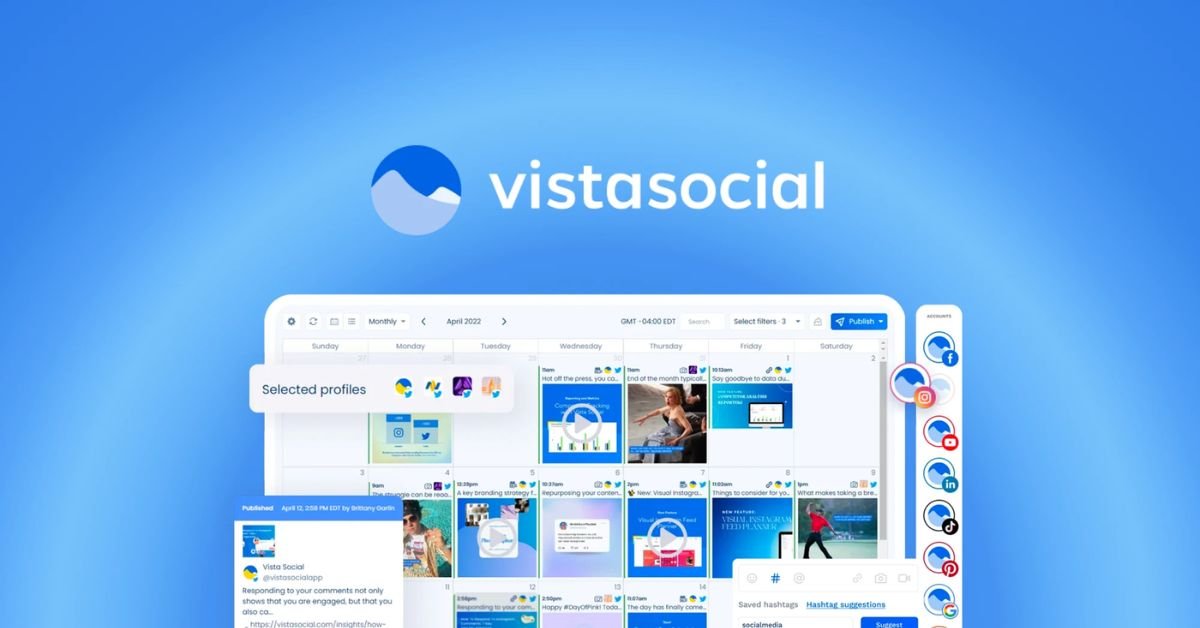
- Smart scheduling for consistent posting
- Unified inbox for faster engagement
- Powerful analytics for better decisions
- AI tools for content creation
If you run a blog, brand, or online business in the health and beauty space, you already know that social media is not optional anymore. Platforms like Instagram, Facebook, TikTok, and Pinterest drive massive traffic, build trust, and turn followers into customers. But managing all of this manually can quickly become exhausting and inconsistent.
That is where tools like Vista Social step in. It promises to simplify your workflow, automate posting, improve engagement, and help you grow faster without burning out. The big question is simple. Can it actually deliver results, or is it just another tool with big claims?
This detailed Vista Social review breaks everything down in a clear and practical way. You will see how it works, what features matter most, and whether it fits your content strategy, especially if you are promoting health, skincare, or wellness products.
What Is Vista Social?
Vista Social is a complete social media management platform designed to help creators, bloggers, and businesses manage multiple social accounts from one dashboard.
Key highlights
- Centralised dashboard for all platforms
- Post scheduling and automation
- Social inbox for messages and comments
- Analytics and reporting tools
- AI-based content assistance
For health and beauty bloggers, this matters because consistency is everything. Posting skincare tips, product benefits, and transformation stories regularly builds authority and trust. Vista Social helps you stay consistent without spending hours every day.
Why Social Media Growth Matters in Health and Beauty?
The health and beauty niche is highly visual and trust-based. People want to see results, reviews, and real experiences before they buy anything.
Why growth is important
- Builds trust with your audience
- Increases product sales and affiliate income
- Drives traffic to your blog or website
- Positions you as an expert in your niche
Vista Social focuses on helping you grow through better content planning, automation, and engagement tracking. This is especially useful if you are promoting skincare brands, supplements, or beauty routines.
Core Features of Vista Social

Vista Social offers a range of tools designed to simplify content management and improve engagement. These features help save time, maintain consistency, and support long-term social media growth, especially for bloggers and online businesses.
1. Content Scheduling and Publishing
This is one of the strongest features.
You can plan your posts in advance and schedule them across platforms like Instagram, Facebook, LinkedIn, and more.
Benefits
- Saves time and effort
- Maintains posting consistency
- Allows batch content creation
- Reduces daily workload
For example, you can schedule a full week of skincare tips, product promotions, and educational posts in one sitting.
2. Social Media Inbox
Managing comments and messages can become overwhelming as your audience grows.
Vista Social combines all interactions into one inbox.
Benefits
- Reply faster to followers
- Never miss customer queries
- Build stronger relationships
- Improve engagement rates
This is very useful if you are handling product inquiries or customer feedback.
3. Analytics and Performance Tracking
Data is key if you want real growth.
Vista Social provides detailed analytics about your content performance.
You can track
- Engagement rates
- Follower growth
- Best performing posts
- Click-through rates
This helps you understand what type of content works best in your health or beauty niche.
4. AI Content Assistance
Creating content daily can feel repetitive.
Vista Social includes AI tools to help generate captions, ideas, and post variations.
Benefits
- Saves time on writing captions
- Helps maintain consistency
- Generates fresh content ideas
This is helpful if you are promoting multiple products or writing daily skincare tips.
5. Social Listening and Monitoring
This feature allows you to track mentions of your brand or niche.
Why it matters
- Understand audience preferences
- Monitor competitors
- Find trending topics
- Respond quickly to feedback
For example, if a certain skincare ingredient is trending, you can quickly create content around it.
How Vista Social Helps Grow Your Social Media
Vista Social is more than just a scheduling tool. It acts as a complete growth system that helps you stay consistent, connect with your audience, and make smarter content decisions. When used properly, it can turn a slow or inactive account into a strong and engaging social media presence.
Consistent Posting Schedule
Consistency plays a major role in social media growth. Platforms favour accounts that post regularly, and audiences are more likely to engage when they see fresh content frequently. Vista Social makes this easier by allowing you to schedule posts in advance.
Instead of worrying about what to post every day, you can plan your content weekly or even monthly. For example, you can schedule skincare tips, product reviews, and beauty routines ahead of time. This ensures your profile remains active without daily effort. Over time, this regular posting builds trust and keeps your audience engaged with your content.
Faster Engagement with Followers
Engagement is one of the strongest signals for growth. When followers comment or send messages, responding quickly can significantly improve your relationship with them. Vista Social helps by combining all comments, messages, and mentions into a single dashboard.
This means you do not have to switch between different platforms to reply. You can respond faster, answer questions, and interact with your audience more efficiently. As a result, your followers feel valued and are more likely to engage again, which boosts your overall visibility and reach.
Data-Driven Content Strategy
Posting without analysing results can slow down your growth. Vista Social provides detailed analytics that help you see what is working and what is not. You can track engagement rates, follower growth, and performance of each post.
For example, you might notice that tutorial videos perform better than static images, or that posts at a certain time get more interaction. This information allows you to refine your strategy and focus on content that delivers results. Over time, this leads to better engagement and faster growth.
Time-Saving Automation
Managing multiple social media accounts manually can take a lot of time. Vista Social reduces this burden by automating repetitive tasks like scheduling posts and organising content.
With automation, you can focus more on creating high-quality content instead of handling routine tasks. This improves productivity and allows you to maintain a consistent presence without feeling overwhelmed. Better content combined with regular posting naturally leads to improved performance.
Combined Impact on Growth
When these features work together, the results become clear. Your account stays active because of consistent posting. Engagement improves because you respond faster. Your strategy becomes stronger with data insights, and automation saves valuable time.
All these factors contribute to increased visibility, stronger audience relationships, and steady growth. For health and beauty creators, this means more followers, higher trust, and better chances of turning engagement into real results.
Pros and Cons of Vista Social
Pros
- Easy to use dashboard
- Powerful scheduling tools
- Detailed analytics
- AI content support
- Multi-platform management
Cons
- Learning curve for beginners
- Advanced features may take time to master
- Paid plans required for full access
Overall, the pros clearly outweigh the cons if you are serious about growth.
Pricing Overview
Vista Social offers different pricing plans based on your needs.
General idea
- Free plan with limited features
- Paid plans with advanced tools
- Custom plans for agencies
For bloggers and small businesses, the basic paid plan is usually enough to start seeing results.
Vista Social Feature Breakdown
| Feature | Description | Best For |
|---|---|---|
| Content Scheduling | Plan and automate posts | Consistency |
| Social Inbox | Manage messages and comments | Engagement |
| Analytics | Track performance and growth | Strategy improvement |
| AI Content Tools | Generate captions and ideas | Content creation |
| Social Listening | Monitor trends and mentions | Market insights |
Who Should Use Vista Social?
Vista Social is suitable for different types of users.
Ideal users
- Health and beauty bloggers
- Affiliate marketers
- Skincare brands
- Social media managers
- Small business owners
If your goal is to grow traffic, increase engagement, and boost conversions, this tool fits well.
Real Use Case for Health and Beauty Bloggers

Imagine you run a skincare blog promoting products like face wash, serums, and creams.
With Vista Social you can
- Schedule daily skincare tips
- Share product reviews consistently
- Respond quickly to audience questions
- Track which posts drive the most clicks
This leads to more trust, more traffic, and higher sales.
Tips to Get the Best Results
Using a tool alone will not guarantee growth. The real results come when you combine the right strategy with consistent execution. Vista Social gives you the tools, but how you use them makes the difference between average and strong performance.
Post Consistently at the Same Time
Consistency is one of the most important factors in building a strong social media presence. Posting at the same time every day or week helps your audience know when to expect your content. It also signals to social platforms that your account is active and reliable.
With Vista Social, you can schedule posts in advance, which removes the stress of daily posting. Choose time slots when your audience is most active and stick to them. Over time, this builds a habit for your followers and increases your chances of getting better engagement on every post.
Focus on High-Quality Visuals
In the health and beauty niche, visuals play a major role in attracting attention. Whether it is skincare routines, product shots, or transformation results, high-quality images and videos perform better than basic content.
Make sure your visuals are clear, well-lit, and visually appealing. Use consistent colours and styles to create a recognisable brand identity. When combined with Vista Social’s scheduling tools, you can plan visually appealing content in advance and maintain a professional feed.
Use Engaging Captions
A good caption can turn a simple post into an engaging conversation. Instead of writing generic descriptions, focus on captions that connect with your audience. Ask questions, share tips, or highlight benefits in a relatable way.
Vista Social’s AI tools can help generate caption ideas, but adding your personal touch makes them more effective. Engaging captions encourage likes, comments, and shares, which directly improves your reach and visibility.
Reply to Comments Quickly
Fast responses build trust and strengthen your relationship with your audience. When someone takes the time to comment or ask a question, replying quickly shows that you value their interaction.
Vista Social’s unified inbox helps you manage all comments and messages in one place. This makes it easier to stay responsive without missing important interactions. The more you engage, the more active and loyal your audience becomes.
Track Analytics Weekly
Growth becomes easier when you track what works and what does not. Instead of posting randomly, review your performance regularly. Check which posts get the most engagement, what time works best, and which topics attract more attention.
Vista Social provides detailed analytics that help you make better decisions. By reviewing your data weekly, you can adjust your strategy and focus on content that delivers results. This improves your efficiency and speeds up your growth.
Combine Strategy with Consistency
When you combine consistent posting, strong visuals, engaging captions, quick responses, and regular analysis, your results improve significantly. Each of these elements supports the others, creating a balanced and effective strategy.
With Vista Social supporting your workflow, you can stay organised, save time, and focus on creating content that truly connects with your audience. Over time, this approach leads to better engagement, stronger visibility, and steady social media growth.
Comparison with Other Tools
Vista Social competes with tools like Hootsuite and Buffer.
Key differences
- More modern interface
- Strong AI features
- Better engagement tools
- Competitive pricing
It offers a balanced mix of features suitable for both beginners and advanced users.
Common Mistakes to Avoid
Even with a good tool, mistakes can slow your growth.
Avoid these
- Posting irregularly
- Ignoring comments and messages
- Not tracking analytics
- Over-promoting products
- Using low-quality visuals
Fixing these can improve your results quickly.
Final Verdict:
Vista Social delivers on its promise if used correctly.
It simplifies social media management, saves time, and helps improve consistency and engagement. For health and beauty bloggers, it can become a powerful tool to grow your audience and increase conversions.
If you are serious about building your brand, driving traffic, and scaling your online presence, Vista Social is definitely worth trying.
Must Read:
- Emergent Reviews: Build Full Apps Without Coding?
- GreenGeeks Reviews: Affordable Hosting or Hidden Costs?
- GeneratePress Review: Why Bloggers Love This Theme?
FAQs:
1. Is Vista Social good for beginners?
Yes, Vista Social is suitable for beginners who want to manage social media more efficiently. Its dashboard is clean and structured, making it easier to schedule posts, track performance, and reply to messages. While some advanced tools take time, most users can start quickly without technical knowledge.
2. Can Vista Social really help grow social media accounts?
Vista Social can support social media growth by improving consistency, engagement, and content planning. It allows users to schedule posts regularly, respond faster to followers, and analyse performance. These factors play a key role in increasing visibility, building trust, and attracting more followers over time.
3. Which social media platforms are supported by Vista Social?
Vista Social supports major platforms like Instagram, Facebook, LinkedIn, Twitter, TikTok, and Pinterest. This allows users to manage multiple accounts from one dashboard. For bloggers and businesses, this means saving time and maintaining consistent content across all platforms without switching between different apps or tools.
4. Is Vista Social a good option for health and beauty bloggers?
Yes, Vista Social works well for health and beauty bloggers who rely on consistent posting and audience engagement. It helps schedule skincare tips, product promotions, and educational content. The analytics feature also helps identify what content performs best, which can improve traffic and conversions.
5. How does Vista Social compare with other tools like Hootsuite or Buffer?
Vista Social offers similar core features like scheduling and analytics but stands out with modern tools such as AI content assistance and a unified inbox. Compared to tools like Hootsuite and Buffer, it provides a more streamlined and feature-rich experience.
6. Is the free plan of Vista Social enough to start?
The free plan is useful for beginners who want to test the platform before upgrading. It includes basic scheduling and limited features. However, to fully benefit from automation, analytics, and advanced tools, upgrading to a paid plan is recommended for better long-term growth and performance.
- Smart scheduling for consistent posting
- Unified inbox for faster engagement
- Powerful analytics for better decisions
- AI tools for content creation