

- All-in-one marketing automation platform
- One-time payment, no monthly fees
- Unlimited workflows and automation capabilities
- Integrated email, billing, and forms
Running an online business today often means managing multiple tools at once. One for email marketing, one for automation, one for billing, and another for forms. This setup increases costs and slows down your workflow.
That is where Pabbly steps in. It brings essential business tools into one single platform so you can manage everything from one dashboard.
This detailed Pabbly Review explores whether Pabbly can truly replace all your marketing tools. You will get a clear breakdown of features, pricing, pros, cons, and real use cases so you can make the right decision.
Quick Overview of Pabbly
A quick look at what Pabbly offers and who it is best suited for.
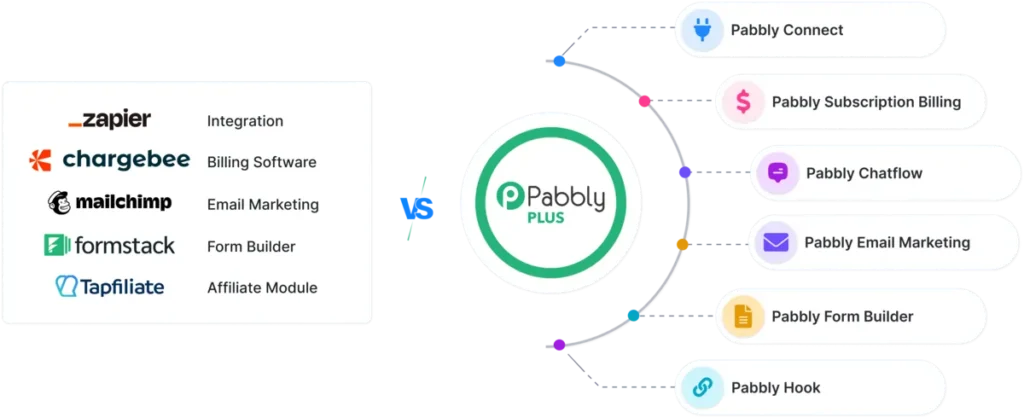
Pabbly is not a single tool. It is a bundle of business solutions designed to simplify operations. It combines automation, email marketing, subscription billing, and form building into one platform.
What Pabbly Offers
- Automation workflows
- Email marketing campaigns
- Subscription billing
- Form creation
- Integration with multiple apps
Who Should Use Pabbly
- Bloggers
- Affiliate marketers
- Agencies
- SaaS businesses
- Small business owners
If you are using tools like Zapier, Mailchimp, or Stripe, Pabbly aims to combine them into one solution.
Key Features of Pabbly
This section covers the core features that make Pabbly a complete marketing platform.
Pabbly Connect (Automation Tool)
Pabbly Connect helps automate repetitive tasks and connect multiple apps without coding.
Key Features
- Multi-step workflows
- Conditional logic
- Unlimited automation in many plans
- Integration with popular apps
Example Workflow
- User fills a form
- Data is sent to Google Sheets
- Email is triggered
- Lead is added to CRM
This reduces manual work and increases efficiency.
Pabbly Email Marketing
Email marketing is essential for building relationships and driving conversions.
Features
- Bulk email sending
- Automation sequences
- Audience segmentation
- Campaign tracking
Why It Stands Out
Unlike Mailchimp, Pabbly allows unlimited subscribers without increasing cost.
Best Use Cases
- Affiliate promotions
- Product launches
- Newsletter campaigns
Pabbly Subscription Billing
Managing recurring payments is simple with this feature.
What You Get
- Subscription management
- Automated billing cycles
- Payment tracking
- Integration with payment gateways
Key Advantage
No extra transaction fee from Pabbly makes it cost-effective compared to many platforms.
Pabbly Form Builder
Form creation is simple and effective with built-in integrations.
Features
- Drag-and-drop builder
- Custom fields
- Payment collection
- Direct integration with automation
Use Cases
- Lead generation
- Surveys
- Customer feedback
- Registration forms
Pabbly vs Other Marketing Tools

This comparison helps you see how Pabbly performs against popular tools.
Pabbly combines multiple tools into one, which reduces dependency on separate platforms.
Comparison Table
| Feature | Pabbly | Zapier | Mailchimp | Stripe |
|---|---|---|---|---|
| Automation | Yes | Yes | Limited | No |
| Email Marketing | Yes | No | Yes | No |
| Subscription Billing | Yes | No | No | Yes |
| Pricing Model | One-time option | Monthly | Monthly | Transaction-based |
| Task Limits | Unlimited | Limited | Limited | N/A |
Key Insights
- Pabbly offers more value in a single platform
- Lower long-term cost compared to competitors
- Suitable for businesses looking to simplify operations
Benefits of Using Pabbly
Here are the major advantages that make Pabbly appealing for marketers and business owners.
Cost Efficiency
One of the biggest advantages of Pabbly is its cost-saving model. Most marketing tools charge monthly fees, and when you combine multiple tools like email marketing, automation, and billing platforms, the total cost can become quite high. Pabbly offers lifetime deals, which means you pay once and use the tool for years without recurring charges. This is especially useful for startups, bloggers, and small businesses that want to control expenses while still using powerful tools.
Over time, the savings can be significant. Instead of paying separate subscriptions for tools like Zapier or Mailchimp, you can manage everything within one platform. This makes budgeting easier and reduces financial pressure as your business grows.
All-in-One Solution
Pabbly stands out because it combines multiple business tools into one platform. You do not need separate services for automation, email marketing, subscription billing, and form building. Everything is available in a single dashboard.
This all-in-one approach simplifies your workflow. You can create a form, capture leads, send emails, and automate follow-ups without switching between tools. It reduces confusion and improves productivity because all your data and processes stay connected.
For business owners managing multiple tasks, this level of convenience makes a noticeable difference in daily operations.
Unlimited Workflows
Automation is a key part of scaling any online business, and Pabbly offers a strong advantage here. Many automation tools limit the number of tasks or workflows you can run each month. Once you reach the limit, you need to upgrade your plan.
Pabbly removes this restriction in many of its plans by allowing unlimited workflows. This means you can automate as many processes as needed without worrying about extra costs.
Whether you are handling hundreds or thousands of actions, your system continues to run smoothly. This flexibility allows you to grow your business without constantly monitoring usage limits.
Easy Integration
Pabbly makes it simple to connect different apps and services. With its automation tool, you can link your favourite platforms and create workflows that run automatically.
For example, when a user signs up through a form, their data can instantly move to your email list, CRM, or spreadsheet. This reduces manual work and ensures that your processes stay consistent.
Even though it may not have as many integrations as larger platforms, it still supports most commonly used tools. For many users, this is more than enough to build efficient systems.
Scalability
Pabbly is designed to support both beginners and advanced users. If you are just starting, you can create simple workflows and gradually build more advanced systems as you gain experience.
As your business grows, Pabbly grows with you. You can handle more leads, more emails, and more automation without needing to switch platforms. This makes it a long-term solution rather than a temporary tool.
For agencies and businesses managing multiple clients, this scalability becomes even more valuable. It allows you to expand operations without increasing complexity or costs significantly.
Limitations of Pabbly

No tool is perfect, and Pabbly also comes with a few limitations that you should consider before making a decision.
Interface Design
One of the first things users notice about Pabbly is its interface. While it is functional and gets the job done, it does not feel as modern or visually refined as some competing platforms. Tools like Zapier or Mailchimp offer cleaner dashboards with more polished designs.
In Pabbly, some sections may feel slightly outdated or less intuitive, especially for first-time users. Navigation is still manageable, but it may take a bit of time to get fully comfortable with where everything is located. For users who value aesthetics and smooth user experience, this could feel like a drawback.
That said, once you get familiar with the layout, the interface becomes easier to use, and the focus shifts more toward functionality rather than design.
Learning Curve
Pabbly is powerful, but with that power comes a learning curve. Beginners who have never used automation tools before may find it slightly challenging at the start. Setting up workflows, applying filters, and managing multi-step automation requires basic logical thinking.
Unlike simple tools where you just click and run, Pabbly expects you to understand how different apps connect and how data flows between them. This can feel overwhelming in the beginning, especially if you are trying to build complex workflows.
However, once you understand the basics, the platform becomes much easier to handle. With practice, users can create highly efficient systems that save time and effort. The initial learning phase is the main hurdle.
Limited Integrations
Another limitation is the number of native integrations. While Pabbly supports many popular apps, it still does not match the extensive integration library of tools like Zapier.
This means that if you rely on very specific or less common apps, you might not find direct integration within Pabbly. In such cases, you may need to use webhooks or APIs, which can require additional setup and technical knowledge.
For most users, the available integrations are more than enough for daily operations. But for advanced users or large businesses with complex tech stacks, this limitation can sometimes slow down workflow creation.
Overall, these limitations do not make Pabbly a bad choice, but they are important to keep in mind so you can set the right expectations before using the platform.
Real-World Use Cases
This section shows how Pabbly can be used in practical scenarios.
Affiliate Marketing Automation
- Capture leads automatically
- Send email sequences
- Track engagement
E-commerce Workflow
- Manage orders
- Send notifications
- Follow up with customers
Agency Management
- Handle multiple clients
- Automate reporting
- Improve workflow efficiency
How Pabbly Helps Bloggers and Affiliate Marketers
If you run a blog or affiliate site, Pabbly can simplify your process.
It helps automate tasks that usually take time and effort.
Key Benefits
- Automate lead capture
- Send targeted email campaigns
- Track user actions
- Improve conversion rates
Example Funnel
- Visitor lands on your blog
- Submits email
- Receives automated emails
- Clicks affiliate links
This creates a complete automated marketing system.
Pricing Breakdown
Pricing is one of the biggest advantages of Pabbly.
Pabbly offers flexible pricing models that suit different users.
Plans
- Lifetime deal options
- Monthly subscription plans
- Tier-based pricing
Why It Stands Out
Unlike tools that charge monthly, Pabbly offers long-term savings through one-time payment plans.
Tips to Get the Most Out of Pabbly
Using Pabbly effectively can improve your results.
Best Practices
- Start with simple workflows
- Use ready-made templates
- Test automation before scaling
- Keep workflows organised
- Monitor performance regularly
Is Pabbly Beginner-Friendly?
Pabbly is suitable for beginners, but it requires some initial learning.
Easy Aspects
- Simple interface
- Pre-built workflows
- Step-by-step setup
Challenging Areas
- Automation logic
- Advanced integrations
With practice, it becomes easier to use.
Security and Reliability
Security is important when managing business data.
Pabbly provides reliable performance and secure data handling.
Key Points
- Stable platform
- Secure integrations
- Consistent performance
This makes it a dependable choice for most businesses.
Final Verdict:
Pabbly offers a powerful combination of tools in one platform.
It can replace multiple marketing tools for many users, especially those looking to reduce costs and simplify operations.
While it has a slight learning curve, the benefits outweigh the limitations for most users.
Must Read:
- Foxit Review: Is It Better Than Adobe Acrobat?
- Omnisend Review: Is It Worth It for Online Stores?
- Box Review: Best Cloud Storage for Business?
FAQs:
1. Can Pabbly really replace multiple marketing tools?
Yes, Pabbly can replace several tools like email marketing, automation, billing, and form builders in one platform. It may not fully replace every advanced feature of specialised tools, but for most businesses, it covers core needs efficiently and reduces the need for multiple subscriptions.
2. Is Pabbly suitable for beginners?
Pabbly is beginner-friendly but requires some learning at the start. New users may need time to understand automation workflows and integrations. Once the basics are clear, it becomes much easier to use and manage, even for those without technical knowledge or prior experience with automation platforms.
3. How does Pabbly compare to Zapier?
Compared to Zapier, Pabbly offers more cost-effective pricing, especially with lifetime deals. However, Zapier provides more integrations and a slightly smoother interface. Pabbly is better for budget-conscious users, while Zapier suits those needing a wider range of app connections and simpler onboarding.
4. Does Pabbly charge transaction fees?
No, Pabbly does not charge additional transaction fees on payments processed through its subscription billing system. This makes it a cost-effective choice for businesses handling recurring payments, especially when compared to other platforms that take a percentage of each transaction along with payment gateway charges.
5. What types of businesses benefit most from Pabbly?
Pabbly works well for bloggers, affiliate marketers, small businesses, SaaS platforms, and agencies. It is ideal for users who want to automate tasks, manage leads, send emails, and handle billing without relying on multiple tools, making it suitable for both beginners and growing businesses.
6. Is Pabbly a one-time payment tool?
Pabbly offers both lifetime deals and subscription plans. Many users prefer the one-time payment option because it eliminates monthly costs. This makes it a strong choice for long-term use, especially for entrepreneurs who want predictable expenses and a complete set of marketing tools in one platform.
Conclusion:
Choosing the right marketing tools can impact your business growth. Managing multiple platforms often leads to higher costs and inefficiency.
Pabbly solves this by combining automation, email marketing, billing, and forms into one system. It is a practical solution for bloggers, marketers, and small businesses.
If your goal is to save money, simplify your workflow, and improve productivity, Pabbly is a strong option worth considering.
- All-in-one marketing automation platform
- One-time payment, no monthly fees
- Unlimited workflows and automation capabilities
- Integrated email, billing, and forms