
- Industry standard tools for creators
- Advanced editing for professional content
- Creative Cloud access from anywhere
- Seamless workflow across multiple applications
Creative work has changed rapidly over the past few years. From travel vlogs and social media content to professional design and marketing, the demand for high-quality visuals and videos is higher than ever. Whether you are a traveller, freelancer, or business owner, the tools you use can directly impact your results. This is where Adobe continues to stand as a leading name in creative software.
Many creators start with basic tools, but as their needs grow, they look for something more powerful and reliable. This is where Adobe enters the picture with its wide range of professional tools. It promises advanced features, flexibility, and high-quality output across different types of creative work.
But with so many alternatives available today, an important question comes up. Is Adobe still the best choice, or are there better options now?
This detailed Adobe Reviews covers everything you need to know about Adobe, including its features, benefits, performance, and real-life use. If you are planning to upgrade your creative tools or start your content journey, this guide will help you make the right decision.
What is Adobe?
Adobe is a global software company that provides tools for creative design, video editing, photography, and digital content creation. It is widely used by professionals, businesses, and creators around the world.
The company offers a collection of applications under its Creative Cloud platform. These tools cover different creative needs, allowing users to work on images, videos, graphics, and documents in one ecosystem.
Some of the most popular tools include:
- Photoshop for photo editing
- Premiere Pro for video editing
- Illustrator for graphic design
- Acrobat for document management
Adobe has built a strong reputation over the years by delivering reliable and high-quality software for creative work.
Why Creative Software Matters Today
Content creation is now an essential part of communication, marketing, and storytelling. From travel content to business promotions, visuals play a major role in capturing attention.
Using advanced tools like Adobe helps improve quality and efficiency.
Key reasons why creative software is important:
- Create professional-level content
- Improve editing speed
- Enhance visual appeal
- Maintain brand consistency
- Support multiple content formats
With Adobe, users can handle different types of creative work in one place, making it a powerful solution for modern creators.
Key Features of Adobe
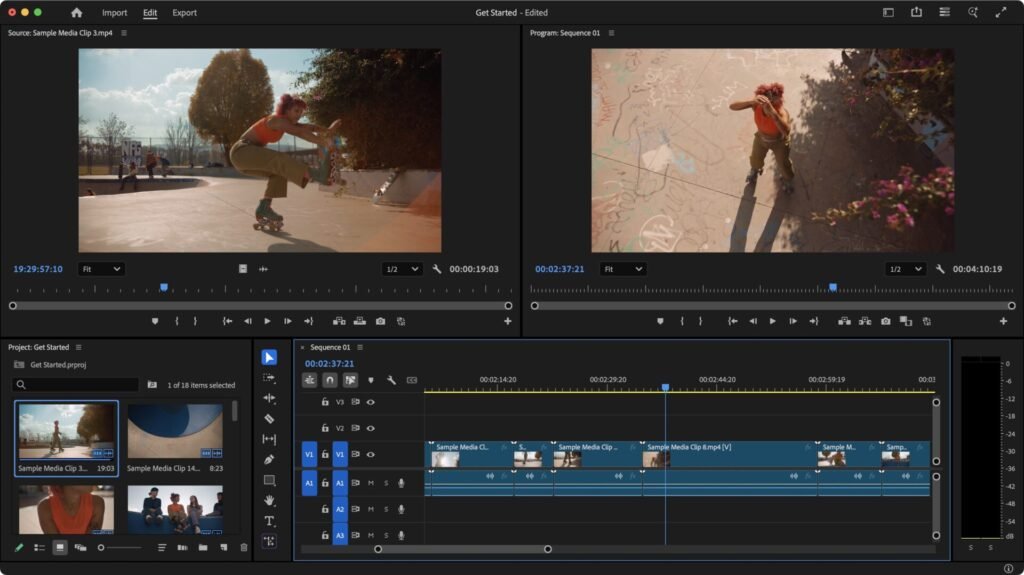
Adobe is designed to support creators at every level, from beginners to professionals. Its features focus on flexibility, performance, and seamless workflow, making it one of the most powerful creative platforms available. Whether you are editing photos, creating videos, or designing graphics, Adobe provides tools that help you work efficiently and produce high-quality results.
All-in-One Creative Suite
One of the biggest strengths of Adobe is its all-in-one creative suite. Instead of using separate tools for different tasks, you get access to multiple applications within a single platform.
This includes tools for photo editing, video production, graphic design, and document management. Having everything in one place makes your workflow smoother and more organised. You can switch between tools easily without losing progress, which saves time and effort.
Cloud Storage
Adobe offers cloud storage that allows you to save and access your files from anywhere. This feature is especially useful for remote workers and travellers who need flexibility.
You can start a project on one device and continue it on another without any issues. Cloud storage also helps keep your work safe and organised. It reduces the risk of losing files and makes sharing content with others easier.
Advanced Editing Tools
The platform is known for its advanced editing capabilities. Adobe provides professional-level tools for editing images, videos, and graphics with precision.
You can adjust colours, enhance details, create effects, and customise your content according to your needs. These features give you full creative control, allowing you to produce high-quality work that stands out.
Cross-Platform Support
Another key feature of Adobe is its cross-platform compatibility. It works on different devices and operating systems, including desktops, laptops, and mobile devices.
This flexibility allows you to work from anywhere without being restricted to a single device. Whether you are at home, in the office, or travelling, Adobe ensures that your tools are always accessible.
Regular Updates
Adobe regularly updates its software to improve performance and add new features. These updates help keep the platform modern and aligned with current creative trends.
Users benefit from improved tools, better speed, and enhanced functionality over time. Regular updates ensure that Adobe remains competitive and continues to meet the needs of creators.
Integration Between Apps
One of the most powerful aspects of Adobe is how its apps work together. You can easily move projects between different tools without complications.
For example, you can edit an image in Photoshop and use it in Premiere Pro or Illustrator. This seamless integration improves workflow and makes complex projects easier to manage. It allows you to combine different creative elements efficiently.
Why These Features Matter
All these features work together to create a complete and reliable creative ecosystem. Adobe focuses on improving productivity, enhancing creativity, and simplifying workflows.
Quick summary of key advantages:
- Multiple tools in one platform
- Cloud access for flexibility
- Advanced editing for professional results
- Works across devices
- Regular updates for improvement
- Seamless app integration
With these features, Adobe continues to be a strong choice for anyone who wants powerful and flexible creative software.
Popular Adobe Tools and Their Uses
Adobe provides different tools for different creative needs.
Photoshop
- Photo editing
- Image enhancement
- Social media graphics
Premiere Pro
- Video editing
- Travel vlogs
- Marketing videos
Illustrator
- Logo design
- Vector graphics
- Branding
Acrobat
- PDF creation and editing
- Document management
Each tool is designed to handle specific tasks effectively.
Travel and Remote Work Benefits of Adobe
For travellers and remote workers, having reliable and flexible tools is essential. Creative work does not stop when you change locations, and managing projects on the move can be challenging without the right setup. This is where Adobe provides a strong advantage by offering a complete ecosystem that supports work from anywhere.
Whether you are editing travel photos, creating videos, or managing client projects, Adobe helps you stay productive without being tied to a fixed workspace.
Create Content from Anywhere
One of the biggest benefits of Adobe is the ability to create content from any location. With cloud-based access and cross-device compatibility, you can work from your laptop, tablet, or even mobile device.
This means you can edit images, design graphics, or work on videos while travelling, sitting in a café, or working remotely. Adobe ensures that your creative process continues without interruption.
Edit Photos and Videos on the Go
For content creators, especially travellers, editing on the go is very important. Adobe provides powerful tools that allow you to edit photos and videos wherever you are.
You can adjust colours, enhance visuals, and create professional-quality content without needing a full studio setup. This helps you capture and share moments quickly, keeping your content fresh and engaging.
Access Files Through Cloud Storage
Cloud storage is one of the most valuable features of Adobe for remote work. It allows you to save your files securely and access them anytime from any device.
You can start working on a project in one location and continue it in another without any hassle. This flexibility makes it easier to manage your work while travelling and ensures that your files are always available.
Work on Multiple Projects
Managing multiple projects while travelling can be difficult, but Adobe makes it easier with its organised workspace and integrated tools.
You can switch between projects, edit different files, and manage your workflow efficiently. This helps you stay organised and maintain productivity even when working in different environments.
Share Content Easily
Sharing content quickly is essential for creators and professionals. Adobe allows you to export and share your work easily with clients, teams, or audiences.
Whether you are uploading content to social media or sending files for review, the process is smooth and efficient. This helps you stay consistent and meet deadlines without delays.
Why It Matters for Modern Creators
These benefits make Adobe a valuable tool for anyone working remotely or travelling frequently. It supports a flexible lifestyle while maintaining high-quality output.
Quick recap of advantages:
- Work from any location
- Edit content while travelling
- Access files anytime
- Manage multiple projects efficiently
- Share content quickly
With Adobe, you can combine creativity and flexibility without compromise. It allows you to stay productive, organised, and creative no matter where you are.
Real-Life Benefits of Using Adobe
Using Adobe improves both quality and productivity.
Key Benefits
- Professional output
- Faster workflow
- Better creative control
- Reliable performance
- Wide range of tools
These benefits make Adobe a preferred choice for professionals.
Performance and Ease of Use
Performance is a major strength of Adobe.
Performance Highlights
- High-quality output
- Stable software performance
- Fast processing
Ease of Use
- Powerful but complex tools
- Requires learning for beginners
- Strong community support
While Adobe offers advanced features, it may take time to learn.
Pros and Cons
Pros
- Industry-standard tools
- High-quality results
- Wide range of features
- Strong ecosystem
- Regular updates
Cons
- Expensive subscription
- Learning curve
- Requires good hardware
Overall, Adobe offers strong value but may not suit everyone.
Who Should Use Adobe
Adobe is ideal for:
- Designers
- Video editors
- Content creators
- Marketing professionals
- Businesses
It may not be suitable for beginners or low-budget users.
Buying Guide for Adobe
Before choosing Adobe, consider:
- Type of work
- Skill level
- Budget
- Hardware capability
Selecting the right plan ensures better results.
Comparison Table
| Feature | Adobe | Basic Editing Tools |
|---|---|---|
| Quality | High | Medium |
| Features | Advanced | Limited |
| Ease of Use | Moderate | Easy |
| Cost | High | Low |
| Flexibility | High | Medium |
This comparison shows the strength of Adobe.
Tips for Best Results
To get the most out of Adobe, it is important to build your skills step by step and use the tools consistently. Since the platform offers powerful features, a structured approach will help you improve faster and create better results. These simple tips will help you use Adobe more effectively and increase your efficiency over time.
Start with Basic Tools
Adobe includes many advanced features, but it is always better to begin with the basics. Start by learning simple tools like cropping, colour adjustments, and basic editing.
Focusing on core features helps you build confidence and prevents confusion. Once you are comfortable, you can gradually explore more advanced options without feeling overwhelmed.
Learn Gradually
Learning everything at once can be difficult. Instead, take a gradual approach when using Adobe. Focus on one feature or tool at a time and understand how it works.
This method helps you develop a strong foundation and makes it easier to handle complex tasks later. Over time, your skills will improve naturally.
Practice Regularly
Practice is the key to improving your creative skills. The more you use Adobe, the more comfortable you become with its tools and workflow.
Regular practice helps you work faster and produce better results. It also allows you to experiment with different techniques and improve your creativity.
Use Tutorials
There are many tutorials available that can help you learn Adobe more efficiently. Watching guides and following step-by-step instructions can save time and make learning easier.
Tutorials also help you discover new techniques and shortcuts that improve your workflow. This makes your work more efficient and professional.
Keep Software Updated
Keeping your Adobe software updated ensures that you always have access to the latest features and improvements.
Updates often include performance enhancements, new tools, and bug fixes. Using the latest version helps you work more smoothly and take advantage of new capabilities.
Why These Tips Matter
Following these tips helps you improve both your skills and workflow when using Adobe. They make the learning process easier and ensure better results over time.
Quick recap:
- Start with basic tools to build confidence
- Learn step by step for better clarity
- Practice regularly to improve skills
- Use tutorials to speed up learning
- Keep software updated for best performance
By applying these practices, you can make the most of Adobe and create high-quality content with greater ease and confidence.
Must Read:
- RecCloud Reviews: Is This AI Video Tool Worth It?
- Sintra AI Review: Is This AI Business Tool Worth It?
- Emergent Reviews: Build Full Apps Without Coding?
Final Thoughts:
Adobe continues to be one of the most powerful creative software platforms available today. It offers advanced tools, reliable performance, and a complete ecosystem for content creation.
For travellers, remote workers, and professionals, it provides flexibility and high-quality results. While it may require time to learn and a higher investment, the value it delivers makes it worth considering.
If you want professional results and full creative control, Adobe remains one of the best choices available.