- AI video creation made simple
- Fast editing tools for creators
- Generate subtitles and translations easily
- All in one content platform
Creating high-quality video content while travelling or working remotely can be challenging. You need the right tools, enough time, and technical skills to produce engaging videos. For many creators, marketers, and freelancers, this process can feel overwhelming. This is where RecCloud enters the picture as a complete AI-powered content solution.
Imagine being able to turn your ideas into videos, generate subtitles, translate content, and edit media without using multiple tools. Whether you are recording travel vlogs, creating social media content, or working on business presentations, having one platform that handles everything can save a lot of time and effort.
RecCloud is designed to simplify content creation by combining multiple features into one easy-to-use platform. It helps users create, edit, and manage video and audio content efficiently, even without advanced skills.
This detailed RecCloud Reviews covers everything you need to know about RecCloud, including its features, benefits, performance, and real-life use. If you want to improve your content workflow and create videos faster, this guide will help you decide if it is worth using.
What is RecCloud?
RecCloud is an AI-powered platform that helps users create, edit, and manage multimedia content. It combines multiple tools into one system, allowing users to handle video and audio tasks without switching between different software.
The platform offers features such as:
- Video editing
- Audio transcription
- Subtitle generation
- AI video creation
- Translation tools
With RecCloud, users can complete their entire content creation process in one place. It is designed for beginners as well as professionals who want to improve efficiency.
Why AI Video Tools Matter Today?
Content creation has become an important part of digital work. From social media to online business, videos play a major role in communication and engagement. However, creating content manually takes time and effort.
AI tools like RecCloud help solve this problem by automating tasks.
Key reasons why AI video tools are important:
- Save time on editing and production
- Reduce technical complexity
- Improve content quality
- Support multi-language content
- Increase productivity
With RecCloud, users can focus more on creativity while the platform handles technical work.
Key Features of RecCloud
RecCloud brings together multiple AI-powered tools into one platform, making content creation faster, simpler, and more efficient. Instead of using separate software for editing, transcription, and translation, you can handle everything in one place. Each feature is designed to reduce manual effort and help you produce high-quality content with ease.
AI Video Generator
One of the most powerful features of RecCloud is its AI video generator. It allows you to create videos directly from text or scripts without needing advanced editing skills.
You simply provide your content, and the platform turns it into a complete video. This is especially useful for marketers, educators, and creators who want to produce videos quickly. It saves time and removes the need for complex editing tools.
Speech to Text
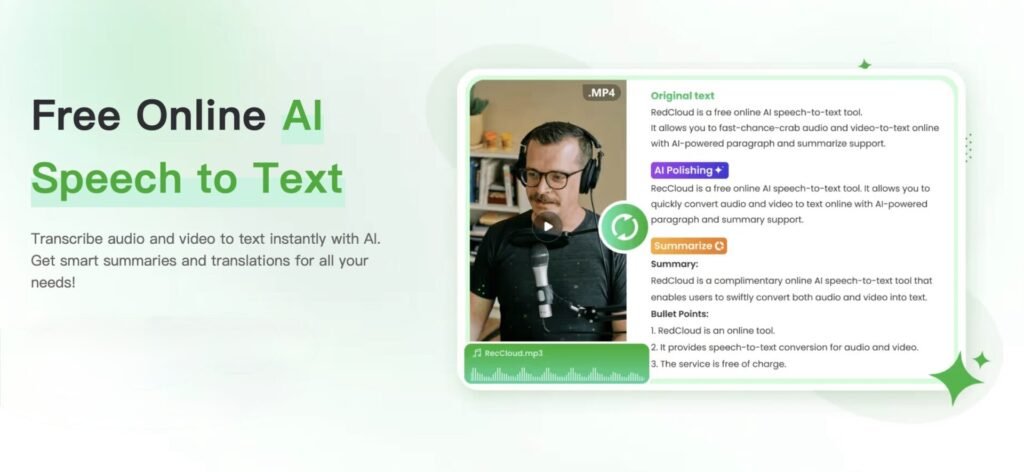
The speech-to-text feature in RecCloud converts audio into written text with high accuracy. This is useful for transcribing meetings, interviews, lectures, or recorded content.
Instead of typing everything manually, you can generate text instantly. This improves productivity and makes it easier to repurpose content for blogs, captions, or notes.
Text to Speech
The text-to-speech feature allows you to convert written content into natural-sounding voiceovers. RecCloud supports multiple languages and voice styles, making it suitable for different types of content.
This is particularly helpful for creating videos, tutorials, or presentations where voice narration is required. It saves time and eliminates the need for recording audio manually.
Subtitle Generator
Adding subtitles to videos improves accessibility and engagement. RecCloud automatically generates subtitles, making the process quick and simple.
Subtitles help reach a wider audience, including viewers who watch videos without sound. This feature is especially useful for social media content and global audiences.
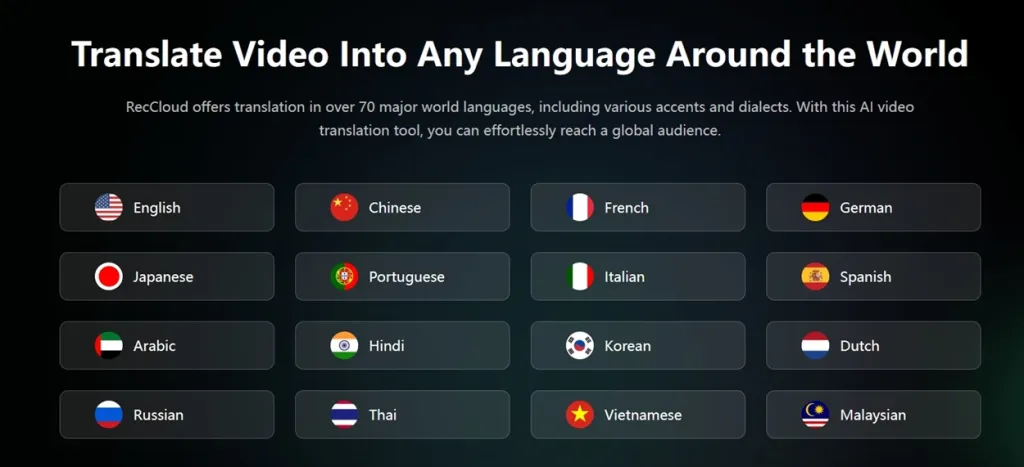
Video Translator
The video translator feature in RecCloud allows you to translate your content into multiple languages. This helps expand your reach and connect with audiences worldwide.
You can create multilingual content without extra effort. This is a valuable feature for businesses, educators, and creators who want to grow globally.
Editing Tools
In addition to AI features, RecCloud includes basic editing tools that allow you to trim, merge, and adjust video content easily.
These tools are simple to use and help refine your videos without needing professional software. You can make quick edits and improve your content directly within the platform.
Why These Features Matter
All these features work together to make RecCloud a complete content creation platform. It simplifies complex tasks and helps users produce content faster and more efficiently.
Quick summary of key advantages:
- AI video creation saves time
- Speech to text improves productivity
- Text to speech adds voiceovers easily
- Subtitles increase accessibility
- Translation expands audience reach
- Editing tools refine content quickly
With these features, RecCloud becomes a practical solution for anyone looking to create and manage content without complexity.
What You Can Create with RecCloud?
The flexibility of RecCloud allows users to create different types of content.
Common Use Cases
- Travel vlogs
- Social media videos
- Educational content
- Marketing videos
- Tutorials
- Podcasts
This makes RecCloud suitable for a wide range of users.
Travel and Remote Work Benefits of RecCloud
For travellers and remote workers, flexibility and efficiency are essential. Creating and managing content while moving between locations can be challenging, especially without access to powerful devices or editing setups. RecCloud solves this problem by offering a simple, cloud-based platform that allows you to work from anywhere.
Whether you are a content creator, freelancer, or digital nomad, RecCloud helps you stay productive without being tied to a fixed workspace.
Create Content from Anywhere
One of the biggest advantages of RecCloud is the ability to create content from any location. Since it works online, you can access it from your laptop or mobile device without needing special software.
This means you can create videos, generate subtitles, or convert audio into text while travelling, sitting in a café, or working from a remote location. RecCloud ensures that your workflow continues smoothly wherever you are.
Edit Videos Without Heavy Software
Traditional video editing tools often require powerful computers and complex installations. This can be difficult for travellers who rely on lightweight devices.
RecCloud removes this limitation by providing built-in editing tools that work directly in your browser. You can trim, adjust, and refine your videos without installing heavy software. This makes content creation easier and more accessible during travel.
Save Time During Travel
Time is limited when you are travelling, and managing content can become overwhelming. RecCloud helps save time by automating tasks like subtitle generation, transcription, and translation.
Instead of spending hours editing or processing content manually, you can complete tasks quickly. This allows you to focus on enjoying your journey while still staying productive.
Work on Multiple Projects
Handling multiple projects while travelling can be challenging. RecCloud makes it easier by keeping everything organised in one platform.
You can manage different projects, edit videos, and create content without switching between tools. This improves efficiency and helps you stay focused on your work, even when your environment changes.
Share Content Easily
Sharing content quickly is important for creators and professionals. RecCloud allows you to export and share your work easily, making collaboration and publishing simple.
Whether you are uploading videos to social media or sending files to clients, the process is smooth and efficient. This helps you maintain consistency and keep your audience engaged.
Why It Matters for Modern Work
These benefits make RecCloud a valuable tool for anyone working remotely or travelling frequently. It supports a flexible lifestyle while maintaining productivity.
Quick recap of advantages:
- Work from any location
- No need for heavy software
- Save time with automation
- Manage multiple projects easily
- Share content quickly
With RecCloud, you can balance work and travel without compromising on quality or efficiency. It allows you to stay creative, productive, and connected wherever you go.
Real-Life Benefits of Using RecCloud
Using RecCloud improves workflow and efficiency.
Key Benefits
- Faster content creation
- Reduced editing effort
- Easy content management
- Better organisation
- Increased productivity
These benefits make RecCloud a practical tool for creators.
Performance and Ease of Use
Performance plays a major role in content tools. RecCloud is designed for smooth and reliable use.
Performance Highlights
- Fast processing speed
- Accurate results
- Stable performance
Ease of Use
- Simple interface
- Easy navigation
- Beginner-friendly
Users can quickly learn and use RecCloud without difficulty.
Pros and Cons
Pros
- All-in-one platform
- Easy to use
- Time-saving features
- Supports multiple languages
- Suitable for beginners
Cons
- Some features require payment
- Depends on internet connection
- Limited advanced editing
Overall, RecCloud offers strong value for content creators.
Who Should Use RecCloud
RecCloud is ideal for:
- Content creators
- YouTubers
- Marketers
- Freelancers
- Students
It may not be suitable for advanced professional editing needs.
Buying Guide for RecCloud
Before using RecCloud, consider:
- Type of content you create
- Features you need
- Budget
- Frequency of use
Choosing the right plan ensures better results.
Comparison Table
| Feature | RecCloud | Traditional Editing Tools |
|---|---|---|
| Ease of Use | Easy | Complex |
| Time Required | Low | High |
| Tools Included | All-in-one | Multiple tools |
| Cost | Moderate | High |
| Flexibility | High | Medium |
This table highlights the efficiency of RecCloud.
Tips for Best Results
To get the best performance from RecCloud, it is important to follow a clear and consistent workflow. Since the platform combines multiple AI tools, using it in the right way can significantly improve your content quality and save time. These simple tips will help you use RecCloud more effectively and achieve better results.
Plan Your Content Clearly
Before starting any project, take a few minutes to plan your content. Decide what type of video or audio you want to create, the message you want to deliver, and the format you will use.
Clear planning helps you use RecCloud more efficiently. When your idea is structured, the AI features can generate more accurate and relevant results. It also reduces the need for repeated edits later.
Use AI Features Step by Step
RecCloud offers multiple AI tools, but using them all at once can feel overwhelming. It is better to use features step by step.
For example, start with generating your script, then create the video, add subtitles, and finally edit the content. This organised approach makes the process smoother and helps you maintain control over your project.
Review Outputs
Even though RecCloud provides fast and accurate results, reviewing your output is essential. Always check your videos, subtitles, and audio to ensure they match your expectations.
This step helps you catch small errors and improve the final result. Reviewing also allows you to refine your content and make it more polished and professional.
Improve Content Gradually
Instead of trying to perfect everything in one step, focus on gradual improvement. Use RecCloud to refine your content over time.
You can edit videos, adjust subtitles, and enhance audio step by step. This approach makes the process easier and helps you create higher-quality content without stress.
Use Regularly
Consistency is key when using any tool. The more you use RecCloud, the better you understand how it works.
Regular use helps you improve your workflow, speed up your process, and get better results. Over time, you will be able to create content more efficiently and with greater confidence.
Why These Tips Matter
Following these tips helps you maximise the potential of RecCloud while maintaining quality and efficiency.
Quick recap:
- Clear planning improves results
- Step-by-step use simplifies workflow
- Reviewing ensures accuracy
- Gradual improvement enhances quality
- Regular use boosts efficiency
By applying these practices, you can make the most of RecCloud and create high-quality content with less effort and better consistency.
Must Read:
- Sintra AI Review: Is This AI Business Tool Worth It?
- Emergent Reviews: Build Full Apps Without Coding?
- WP Rocket Reviews: Does It Really Speed Up Your Website?
Final Thoughts:
RecCloud is a powerful and practical tool for modern content creation. It simplifies the process by combining multiple features into one platform, making it easier to create, edit, and manage videos.
For travellers and remote workers, it offers flexibility and convenience. You can create content from anywhere without needing heavy software or technical skills.
If you are looking for a simple and efficient way to improve your content workflow, RecCloud is worth trying. It may not replace advanced editing tools completely, but it provides a strong solution for everyday content needs.
- AI video creation made simple
- Fast editing tools for creators
- Generate subtitles and translations easily
- All in one content platform