- Premium antivirus with advanced security
- Real time threat protection system
- Includes VPN and password manager
- Strong malware and ransomware defence
Online security has become a daily concern for anyone using the internet. From browsing websites to managing payments and personal data, risks are everywhere. That is why choosing a reliable antivirus is more important than ever. Among premium security tools, NortonLifeLock stands out as one of the most trusted names in the industry.
Norton is not a free antivirus. It positions itself as a complete security solution designed to protect your identity, privacy, and devices. Many users consider it a premium option because of its advanced tools and strong reputation. But the key question remains. Is Norton truly worth paying for in 2026?
This detailed Norton Reviews breaks everything down in a clear and practical way. From features and pricing to real-world performance, you will get a complete picture. If you are thinking about investing in Norton, this guide will help you decide with confidence.
Quick Overview of NortonLifeLock Antivirus
Before going deeper into detailed analysis, it helps to look at a quick snapshot of what Norton offers. This overview gives you a clear idea of its core strengths and why it is considered a premium antivirus solution.
Premium Antivirus with Advanced Protection
Norton is designed as a premium security tool, which means it focuses on delivering high-level protection rather than basic features. It uses advanced technologies like AI-based threat detection and behaviour monitoring to identify and block threats in real time. This makes it highly effective against modern cyber risks such as ransomware, spyware, and phishing attacks.
Includes VPN, Password Manager, and Cloud Backup
One of Norton’s biggest advantages is that it offers more than just antivirus protection. It includes a secure VPN to protect your internet connection, especially on public Wi-Fi. The password manager helps you store and manage login credentials safely, while the cloud backup feature ensures your important files are protected from data loss or cyberattacks. These tools combine to provide a complete security package.
Strong Malware and Ransomware Detection
Norton consistently delivers high malware detection rates. It can identify both known and emerging threats, making it a reliable choice for users who want strong protection. Its ransomware defence is particularly effective, helping prevent unauthorised access to your files and protecting sensitive data from being encrypted by attackers.
Real-Time Threat Monitoring
Real-time protection is a core feature of Norton. It continuously monitors your system for suspicious activity and blocks threats before they can cause damage. This proactive approach ensures that your device remains secure without requiring constant manual checks.
Available Across Multiple Devices
Norton supports a wide range of platforms, including Windows, Mac, Android, and iOS. Many of its plans allow protection for multiple devices under a single subscription. This makes it ideal for individuals and families who want consistent security across all their devices.
This quick overview shows that Norton is more than just antivirus software. It is a complete digital security solution built for users who want strong protection, privacy, and convenience in one package.
Norton Plans Overview Table
| Plan Name | Price Range | Key Features | Best For |
|---|---|---|---|
| Norton Antivirus Plus | Entry level | Malware protection, firewall, backup | Single device users |
| Norton 360 Standard | Mid-range | VPN, password manager | Personal use |
| Norton 360 Deluxe | Popular choice | Multi-device, parental controls | Families |
| Norton 360 Premium | High tier | Identity protection, more storage | Advanced users |
This quick overview shows Norton is built for users who want complete digital protection.
What is Norton Antivirus?
Norton is a premium cybersecurity software designed to protect devices and personal data from digital threats. It goes beyond basic antivirus by offering tools for privacy, identity safety, and secure browsing.
Core Purpose
- Protect devices from malware and viruses
- Secure online transactions and personal data
- Prevent identity theft and phishing attacks
- Provide privacy tools for safer browsing
Norton focuses on giving users an all-in-one solution rather than just basic protection.
Key Features of Norton Antivirus
Norton is packed with powerful features that justify its premium positioning.
Real-Time Threat Protection
- Detects and blocks threats instantly
- Uses advanced AI-based detection
- Protects against ransomware and spyware
Secure VPN
- Encrypts internet connection
- Protects data on public Wi-Fi
- Helps maintain online privacy
Password Manager
- Stores and manages passwords securely
- Generates strong passwords
- Autofill for quick login
Cloud Backup
- Backs up important files
- Protects against data loss from ransomware
- Easy restore options
Dark Web Monitoring
- Alerts if your personal data appears online
- Helps prevent identity theft
These features make Norton a complete digital security suite.
Norton Performance and Speed
Performance is a key factor when choosing antivirus software.
Performance Highlights
- Fast scanning speed
- Minimal impact on system performance
- Smooth background operation
Real Experience
- No noticeable slowdown during browsing
- Quick startup and scan times
- Efficient resource usage
Norton is known for balancing strong protection with smooth performance.
Malware Protection and Security Level
Security is where Norton truly stands out.
Protection Strength
- Very high malware detection rates
- Advanced ransomware protection
- Strong phishing and scam detection
Security Technologies
- Behaviour-based detection
- AI-powered scanning
- Frequent security updates
Reliability
Norton consistently performs well in independent security tests, making it one of the most trusted antivirus solutions.
Norton User Interface and Ease of Use
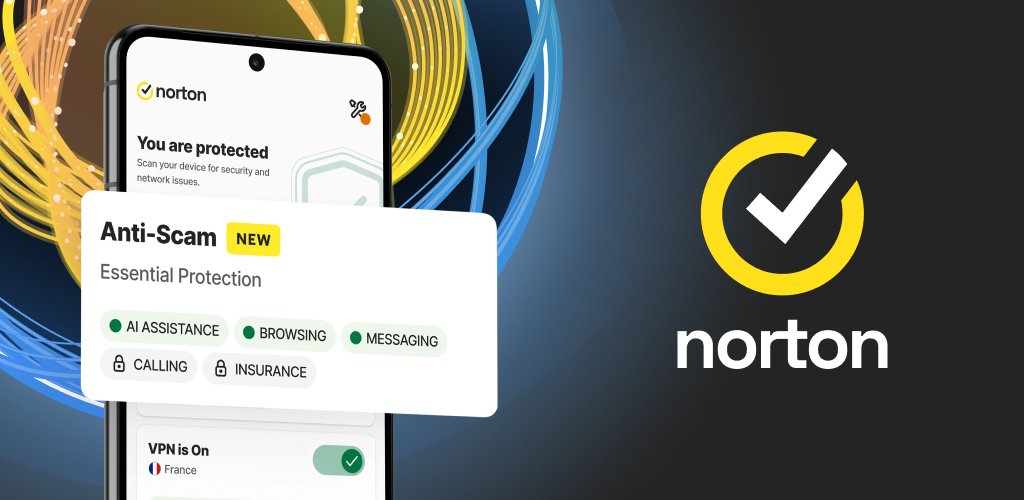
A good interface improves user experience.
Interface Features
- Clean and modern design
- Easy navigation
- Quick access to tools
User Experience
- Suitable for beginners and advanced users
- Simple setup process
- Clear alerts and notifications
Even non-technical users can use Norton without difficulty.
Norton Pricing and Plans
Norton is a premium product, so pricing matters.
Pricing Overview
- No free version available
- Subscription-based plans
- Discounts often available for first year
Value for Money
- Includes multiple tools in one package
- Covers multiple devices
- Saves cost compared to buying separate tools
Norton may seem expensive, but it offers strong value through its features.
Pros and Cons of Norton Antivirus
Pros
- Excellent malware protection
- All-in-one security features
- Strong privacy tools
- No ads or pop-ups
- Multi-device support
Cons
- No free version
- Higher price compared to competitors
- Some features vary by plan
This balance helps users decide quickly.
Norton vs Competitors
Choosing antivirus often involves comparing options.
Norton vs Avast
- Norton offers premium features
- Avast provides a free version
Norton vs McAfee
- Norton has better performance
- McAfee offers strong identity protection
Norton vs Bitdefender
- Bitdefender slightly cheaper
- Norton offers better overall package
Comparison Table
| Feature | Norton | Avast | McAfee | Bitdefender |
|---|---|---|---|---|
| Free Version | No | Yes | No | Limited |
| Malware Detection | Very High | High | High | Very High |
| VPN Included | Yes | Paid plan | Yes | Limited |
| Ease of Use | Easy | Easy | Moderate | Easy |
Who Should Use Norton Antivirus?
Norton is ideal for users who want complete protection.
Best For
- Online shoppers
- Remote workers
- Families with multiple devices
- Users handling sensitive data
Not Ideal For
- Users looking for free antivirus
- Basic users with minimal needs
If security and privacy are your priority, Norton is a strong choice.
Tips to Get the Best Out of NortonLifeLock
Getting the most out of Norton is not just about installing it and leaving everything on default settings. To fully benefit from its premium features, you need to use it actively and build a few smart habits. When used properly, Norton can offer strong protection, better privacy, and smoother performance across all your devices.
Keep Software Updated
Keeping Norton updated is one of the simplest yet most important steps. Cyber threats evolve constantly, and outdated software may not recognise the latest risks. Norton regularly releases updates that include improved malware detection, bug fixes, and new security enhancements.
Enabling automatic updates ensures that your device always stays protected without requiring manual checks. Skipping updates can leave gaps in your security, which attackers may exploit. A fully updated antivirus acts as your first and strongest line of defence.
Enable All Features
Many users install Norton but do not activate all available features. This reduces the level of protection you receive. Make sure tools like the firewall, VPN, cloud backup, and dark web monitoring are all turned on.
Each feature plays a specific role in protecting your device and personal data. The firewall blocks unauthorised network access, while the VPN keeps your online activity private. Cloud backup protects your important files from ransomware attacks. When all features work together, you get complete security instead of partial protection.
Use Password Manager
Weak or repeated passwords are one of the biggest security risks today. Norton’s built-in password manager helps solve this problem by storing and organising your login details securely. It can also generate strong and unique passwords for each account.
This reduces the risk of hacking and makes logging in faster and easier. Instead of remembering multiple passwords, you only need to manage one secure master password. Using this feature can greatly improve your overall online safety.
Run Regular Scans
Even though Norton offers real-time protection, regular scans are still necessary. Scheduling weekly full system scans ensures that no hidden threats remain on your device. Quick scans can be used for daily checks, especially if you frequently download files or install new software.
These scans help detect malware that may not trigger immediate alerts. Consistent scanning keeps your system clean and running smoothly.
Monitor Alerts
Norton provides alerts and notifications whenever it detects suspicious activity or potential risks. Many users ignore these warnings, which can lead to bigger problems later. Pay attention to alerts and take action when needed.
Whether it is a blocked website, a detected threat, or a security recommendation, these notifications are there to help you stay safe. Responding quickly ensures that small issues do not turn into serious threats.
By following these practical tips, you can maximise Norton’s effectiveness and enjoy a safer, faster, and more secure digital experience every day.
Real User Experience and Feedback
User feedback provides valuable insight.
Positive Feedback
- Strong protection
- Easy to use
- Reliable performance
Negative Feedback
- Price concerns
- Renewal costs higher
Most users appreciate Norton for its reliability and features.
Final Verdict:
Norton continues to be one of the most reliable premium antivirus solutions available today. It offers strong malware protection, advanced privacy tools, and a wide range of features that go beyond basic antivirus software. For users who want complete security without relying on multiple tools, Norton provides a convenient all-in-one solution.
While it does not offer a free version, the value it delivers through its features and performance makes it a worthwhile investment for many users. From secure browsing to identity protection, Norton covers all essential aspects of digital safety. It is especially useful for people who manage sensitive information or use multiple devices.
If your priority is strong protection, privacy, and ease of use, Norton is definitely worth considering in 2026. It remains a dependable choice for anyone serious about online security.
Must Read:
- Avast Reviews: Is This Free Antivirus Still Worth It?
- Ultrahost Reviews: Should You Trust This Hosting?
- EmailOctopus Review: Best Budget Email Marketing Tool?
FAQs:
1. Is Norton better than free antivirus software?
Yes, Norton offers advanced features and stronger protection compared to most free antivirus tools.
2. Does Norton include a VPN?
Yes, Norton includes a secure VPN in most of its plans.
3. Is Norton safe to use?
Yes, Norton is considered one of the safest antivirus solutions available.
4. Can Norton protect multiple devices?
Yes, many Norton plans support multiple devices.
5. Does Norton slow down your computer?
No, it is designed to run efficiently with minimal impact on performance.
6. Is Norton worth the price?
For users who need complete security and privacy tools, Norton is worth the investment.
- Premium antivirus with advanced security
- Real time threat protection system
- Includes VPN and password manager
- Strong malware and ransomware defence