


To Create a Website with AI has become easier as artificial intelligence tools continue to improve. Website development traditionally required design skills, coding knowledge, content writing, SEO experience, and technical setup. Today, AI can assist with many of these tasks, allowing beginners, entrepreneurs, startups, creators, and businesses to build websites with less manual work.
An AI-assisted website workflow can help generate page structures, write content drafts, suggest designs, create code, improve layouts, and support SEO tasks. However, creating a successful website is not only about generating pages quickly. A useful website needs a clear purpose, accurate content, good navigation, responsive design, strong SEO fundamentals, and a smooth user experience.
This guide explains how to Create a Website with AI, the benefits of AI website development, important features to consider, SEO best practices, common mistakes, and how businesses can use AI to build a stronger online presence.

- Build Smarter Websites With AI
- Turn Ideas Into Digital Products
- Create Faster With Less Coding
- Customize Projects Using Simple Prompts
What Does It Mean to Create a Website With AI?
To Create a Website with AI means using artificial intelligence to assist with one or more stages of website development. Instead of completing every task manually, users can provide instructions in natural language and allow AI to generate suggestions, content, layouts, code, or other website components.
For example, you could tell an AI website tool that you want a professional website for a fitness business. You might specify that you need a homepage, service pages, pricing section, testimonials, FAQs, contact form, and blog.
The AI can use those instructions to help create an initial website structure. You can then review the result, make changes, add business-specific information, and continue improving the website.
Why Create a Website With AI?
The main reason to Create a Website with AI is to simplify the development process. Building a website from scratch can involve many individual tasks, and AI can assist with several of them.
AI can help users:
- Generate website structures
- Create content drafts
- Suggest page layouts
- Write or explain code
- Generate SEO ideas
- Improve existing content
- Create FAQs
- Suggest calls to action
- Identify potential website issues
- Speed up repetitive tasks
AI does not remove the need for human input. Instead, it can help users move faster while keeping control over the final website.
Benefits of Creating a Website With AI
There are several advantages to using AI during website development.
Faster Development
One of the biggest benefits of using AI to Create a Website with AI is speed. AI can generate a starting point in a short period, allowing users to move quickly from an idea to an initial website.
Instead of creating every page element manually, users can describe what they need and refine the generated result.
Less Technical Knowledge
Traditional website development can require knowledge of HTML, CSS, JavaScript, databases, hosting, and other technologies.
AI website tools can reduce some of these technical barriers. Beginners can describe their requirements using natural language and receive assistance with website creation.
This makes AI particularly useful for entrepreneurs and small businesses that do not have an in-house development team.
Easier Content Creation
Content is one of the most important parts of a website. AI can help create initial drafts for homepage sections, service descriptions, blog posts, FAQs, product descriptions, and other content.
When you Create a Website with AI, generated content should always be reviewed. Businesses should add accurate information, original examples, brand-specific details, and useful insights.
Faster Prototyping
AI can help businesses create prototypes quickly. A startup can turn an initial idea into a basic website and use it to collect feedback from potential customers.
This can be useful when testing a new product, service, landing page, or business concept.
How to Create a Website With AI Step by Step

The process to Create a Website with AI can be divided into several practical steps.
Step 1: Define Your Website Goal
Before using an AI website builder, determine what you want the website to accomplish.
Your website could be designed to:
- Generate leads
- Sell products
- Promote services
- Publish articles
- Build a portfolio
- Collect bookings
- Support a business
- Launch an MVP
- Build an online community
A clear goal gives AI better information to work with and helps you decide which pages and features are necessary.
Step 2: Identify Your Target Audience
The next step is understanding who will use your website.
Think about your target audience's needs, problems, questions, and expectations. If you are building a website for business owners, for example, your content should focus on business outcomes rather than technical details.
When you Create a Website with AI, providing audience information can help generate more relevant content and page structures.
Step 3: Plan Your Website Pages
Before generating the entire website, create a basic sitemap.
A simple business website may include:
- Home
- About
- Services
- Pricing
- Contact
- FAQ
- Blog
- Privacy Policy
- Terms of Service
The exact structure depends on your business.
An ecommerce website may need product categories, product pages, shopping cart functionality, checkout, shipping information, and customer account pages.
Planning the structure first makes it easier to Create a Website with AI that has logical navigation.
Step 4: Write a Detailed AI Prompt
The quality of the instructions you provide can affect the quality of the AI-generated website.
Instead of saying:
“Create a business website.”
Provide more detail.
For example:
“Create a modern website for a digital marketing agency. Include a homepage, SEO services page, content marketing page, about page, contact form, testimonials, FAQ section, blog, and clear calls to action. Make the design responsive, professional, easy to navigate, and optimized for search engines.”
Detailed instructions give AI more context.
Step 5: Generate the Initial Website
Once your requirements are ready, use an AI website builder or AI development platform to generate the initial website.
The platform may create the basic structure, layout, navigation, content sections, and functionality based on your instructions.
The first version should be treated as a starting point rather than a finished website.
Review every section carefully.
Step 6: Customize Your Website
After you Create a Website with AI, customize the result to match your brand.
Update:
- Logo
- Colors
- Fonts
- Images
- Headlines
- Business information
- Product information
- Contact details
- Calls to action
- Testimonials
Customization helps make the website more authentic and less generic.
Step 7: Add High-Quality Content
AI can help generate content, but your website should provide genuine value.
A strong page should answer important questions and provide information that visitors actually need.
For example, a service page should explain what the service includes, who it is for, how the process works, what customers can expect, and how they can contact the business.
When you Create a Website with AI, edit AI-generated content carefully to ensure it is accurate, useful, natural, and aligned with your brand.
Create a Website With AI for SEO
SEO should be considered from the beginning rather than after the website is published.
When you Create a Website with AI, pay attention to important SEO elements such as page titles, headings, URLs, content structure, internal links, image alt text, mobile usability, and page performance.
AI can assist with SEO planning, but search rankings cannot be guaranteed simply by using AI.
Keyword Research
Keyword research helps identify topics and phrases that your audience may search for.
Start with your main business topic and identify related questions and subtopics.
For example, if you operate an accounting software website, related topics might include:
- Small business accounting
- Invoice management
- Business expenses
- Bookkeeping software
- Financial reporting
- Accounting automation
AI can help organize keyword ideas into topic clusters, but keywords should be selected based on relevance and search intent.
Create Helpful Page Titles
Each important page should have a clear title that describes its subject.
Avoid vague titles that do not tell users or search engines what the page is about.
For example, instead of:
“Services”
you could use:
“Digital Marketing Services for Small Businesses”
The second title provides more context.
Use Clear Headings
Headings help organize content.
A typical page might include:
Main Topic
Introduction to the subject.
Key Benefits
Important advantages or information.
How It Works
An explanation of the process.
Frequently Asked Questions
Answers to common user questions.
When you Create a Website with AI, ask the AI tool to organize content logically, but review the heading structure manually.
Optimize Images
Images can improve the visual experience of a website, but large image files can affect loading performance.
Use appropriately sized images and descriptive filenames where useful. Add meaningful alt text when an image needs a text alternative.
Avoid using alt text simply as a place to repeat keywords.
Build Internal Links
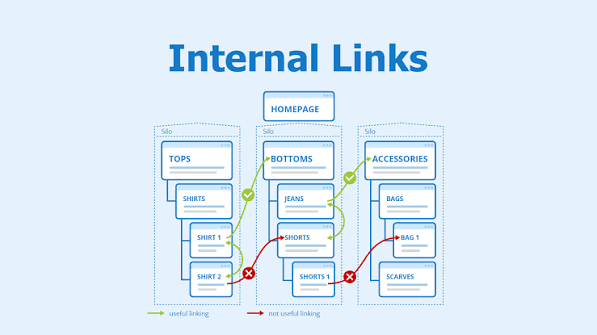
Internal linking connects related pages within your website.
For example, a blog article about SEO can link to your SEO service page. A product guide can link to relevant product pages.
When you Create a Website with AI, AI can suggest internal linking opportunities based on your website content.
Internal links can help users find related information and help search engines understand relationships between pages.
Make Your AI Website Mobile-Friendly
Mobile responsiveness is essential for modern websites.
Your website should work properly across smartphones, tablets, laptops, and desktop computers.
Check:
- Navigation menus
- Buttons
- Forms
- Images
- Text size
- Page spacing
- Tables
- Videos
- Interactive elements
When you Create a Website with AI, do not assume the generated design works perfectly on every device. Test it yourself.
AI Website Design
AI can also assist with website design.
You can provide information about your brand, industry, audience, and preferred style. AI can then suggest layouts, color combinations, typography, sections, and visual structures.
For example, a technology company may want a modern interface with clean typography, product screenshots, feature cards, testimonials, and clear calls to action.
A local restaurant may need menus, opening information, location details, reservation options, food photography, and customer reviews.
The design should support the business goal rather than simply looking impressive.
Create a Website With AI for Small Businesses
Small businesses can benefit significantly from AI-assisted website development.
A local business can use AI to create pages describing services, locations, pricing, FAQs, and customer information.
For example, a home repair company could create individual pages for plumbing, electrical services, emergency repairs, and maintenance.
AI can help create initial content and page structures, while the business owner provides accurate service details.
This approach can make professional website development more accessible.
Create a Website With AI for Startups
Startups often need to move quickly. AI can help founders create landing pages, MVP websites, product pages, waitlists, and early customer experiences.
A startup can begin with a simple website that explains its product and collects leads.
Based on user feedback, the startup can continue improving the website.
This iterative process can help founders avoid spending significant resources on features that customers do not need.
Create a Website With AI for Ecommerce
AI can also assist with ecommerce website development.
An ecommerce website may include:
- Product pages
- Categories
- Search
- Shopping cart
- Checkout
- Customer accounts
- Payment integration
- Order management
- Shipping information
- Product reviews
AI can help generate product descriptions, category structures, FAQs, and content ideas.
However, ecommerce businesses must pay special attention to payment security, customer data, privacy, and accurate product information.
Create a Website With AI for Blogging
Blogging is another area where AI can provide assistance.
AI can help generate article ideas, outlines, FAQs, titles, and first drafts.
However, publishing large amounts of generic AI content is not a strong long-term strategy.
A successful blog should provide original value. Add practical experience, examples, research, unique opinions, useful data, and information that directly addresses reader questions.
When you Create a Website with AI, use AI to improve your content workflow rather than simply producing large quantities of repetitive articles.
AI Website Builder vs Traditional Development
AI website builders and traditional development each have advantages.
An AI website builder can provide speed, accessibility, and simplified workflows.
Traditional development can provide deeper customization and complete control over the underlying code.
The best option depends on your project.
A simple business website may work well with AI-assisted development. A complex enterprise system with specialized infrastructure and integrations may require experienced developers.
AI does not necessarily replace traditional development. It can complement it.
Common Mistakes When Creating a Website With AI
AI can make website development easier, but several mistakes should be avoided.
Publishing AI Content Without Review
AI-generated content may contain inaccurate information or generic statements. Review every important page.
Ignoring SEO
A website should be structured with search visibility in mind from the beginning.
Using Generic Designs
Customize the website so it reflects your actual brand.
Adding Too Many Features
More features do not automatically make a website better. Focus on what users actually need.
Skipping Testing
Check forms, links, navigation, mobile layouts, images, and important functions before publishing.
Forgetting Website Security
Use secure configurations, strong authentication practices, updated dependencies, and appropriate access controls.
How to Improve an AI-Generated Website
After you Create a Website with AI, improvement should be an ongoing process.
Review your analytics and user feedback to identify pages that need attention.
You might improve:
- Page speed
- Headlines
- Calls to action
- Navigation
- Content quality
- Internal links
- Mobile layouts
- Forms
- Product descriptions
- FAQs
AI can help suggest improvements, but decisions should be based on real business goals and user behavior.
Is It Possible to Create a Website With AI Without Coding?
Yes, many modern AI website builders are designed to reduce or eliminate the need for traditional coding.
Users can describe what they want, select options, customize generated elements, and publish the result.
However, more advanced projects may still benefit from coding knowledge or professional development support.
No-code and AI tools are best viewed as ways to reduce technical barriers, not as a guarantee that every type of software project can be built without developers.
Future of AI Website Development
The future of website development is likely to involve greater collaboration between humans and AI.
AI tools may increasingly assist with design, coding, content, SEO, analytics, testing, personalization, and website maintenance.
The process to Create a Website with AI may become more conversational. Users could describe their business goals and allow AI to generate and continuously improve website components based on those requirements.
However, human expertise will remain important for branding, strategy, content accuracy, security, compliance, and user experience.
Must Read:
Final Thoughts:
To Create a Website with AI is now a practical option for businesses, entrepreneurs, startups, creators, and individuals who want to build an online presence with less technical work.
AI can assist with website design, content creation, coding, SEO planning, testing, and customization. This can reduce development time and make website creation more accessible.
However, the quality of the final website depends on more than AI. You still need a clear goal, well-defined audience, useful content, logical navigation, responsive design, SEO fundamentals, security, and regular improvements.
The best approach is to use AI as a development assistant. Let it handle repetitive tasks and provide useful starting points, while you maintain control over your brand, strategy, content, and final decisions.
When used thoughtfully, AI can help turn a simple website idea into a professional digital experience that supports real business and user needs.
- Build Smarter Websites With AI
- Turn Ideas Into Digital Products
- Create Faster With Less Coding
- Customize Projects Using Simple Prompts