


- All-in-one powerful project management tool
- Organise tasks, docs, and workflows
- Boost productivity with smart automation
- Flexible views for every workflow
When it comes to managing work, most people juggle multiple tools. One app for tasks, another for documents, something else for communication, and yet another for tracking progress. This scattered approach often leads to confusion, wasted time, and missed deadlines. That’s where ClickUp enters the picture as a powerful all-in-one solution.
The idea behind ClickUp is simple. Replace multiple tools with a single platform that handles everything from task management to documentation and team collaboration. For freelancers, bloggers, agencies, and businesses, this promise sounds appealing. But the real question remains. Can ClickUp truly replace all your work tools, or is it just another productivity app?
This detailed ClickUp Review breaks down everything you need to know. You will learn about features, benefits, pricing, pros and cons, and real-life use cases. By the end, you will have a clear answer about whether ClickUp is worth your time and investment.
What is ClickUp?
ClickUp is a cloud-based productivity platform designed to manage tasks, projects, and workflows in one place. It combines features that are usually spread across different tools into a single dashboard.
Instead of switching between apps, users can handle everything inside ClickUp. This includes task tracking, document creation, time tracking, goal setting, and automation.
Key Highlights
- All-in-one project management system
- Customisable workflows for any industry
- Built-in docs, chat, and dashboards
- Suitable for individuals and teams
- Scalable for small to large businesses
Real-Life Example
A digital marketer managing blog content, SEO tasks, and social media campaigns can use ClickUp to organise everything. Instead of using Google Docs, Trello, and Slack separately, all tasks and communication can be handled in one platform.
Why People Are Switching to ClickUp?
Many users move to ClickUp because they want to simplify their workflow. Using too many tools often leads to confusion and inefficiency.
Common Problems With Multiple Tools
- Data scattered across different platforms
- Time wasted switching between apps
- Lack of centralised communication
- Higher subscription costs
- Difficult team collaboration
How ClickUp Solves These Problems
ClickUp brings everything together. Tasks, notes, timelines, and team discussions are all in one place. This reduces friction and improves productivity.
Real-Life Scenario
A startup team using five different tools can cut costs and improve efficiency by switching to ClickUp. They can track tasks, manage timelines, and collaborate without leaving the platform.
Core Features of ClickUp
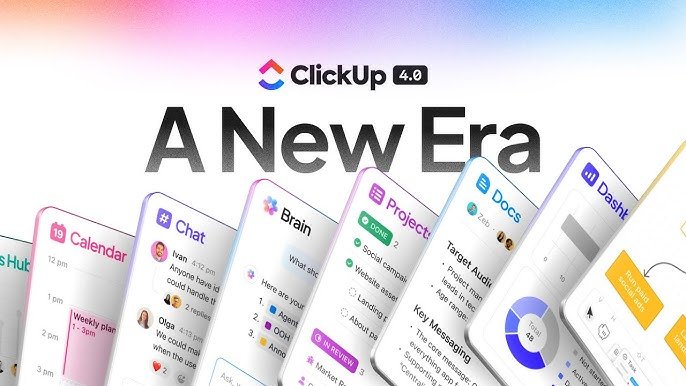
ClickUp stands out because of its wide range of features. These tools are designed to handle almost every aspect of work management.
Task Management
Tasks are the backbone of ClickUp. You can create tasks, assign them, and track progress easily.
- Create tasks and subtasks
- Set priorities and deadlines
- Add attachments and comments
- Track progress with statuses
Views and Layouts
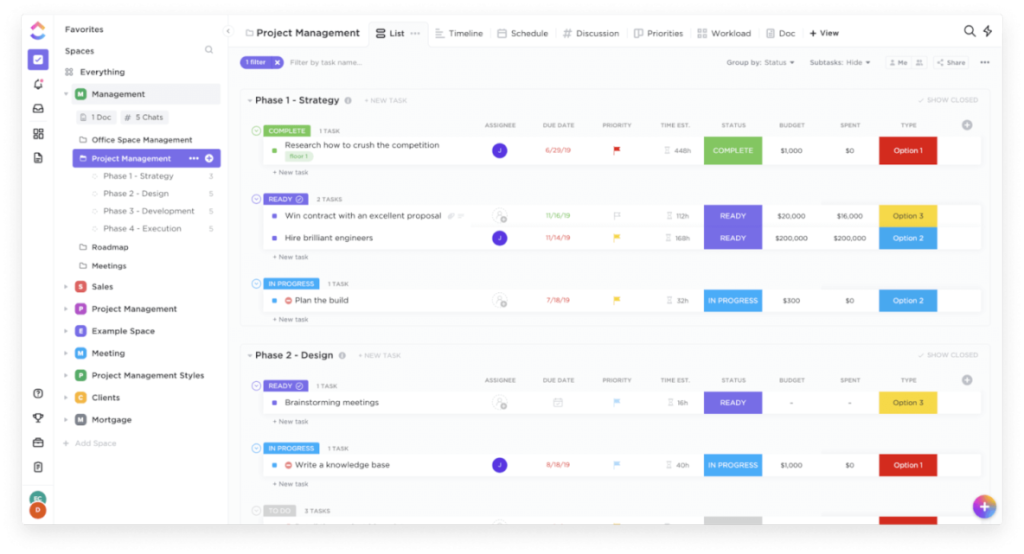
ClickUp offers multiple ways to visualise your work.
- List view for simple tracking
- Board view for workflow management
- Calendar view for scheduling
- Gantt charts for timelines
Docs and Knowledge Base
You can create documents directly inside ClickUp.
- Write blog drafts
- Create SOPs
- Share internal knowledge
- Link docs with tasks
Automation
Automation helps save time by handling repetitive tasks.
- Auto-assign tasks
- Update statuses automatically
- Trigger notifications
Time Tracking
Track how much time is spent on tasks.
- Built-in timer
- Manual time entry
- Reports for productivity
ClickUp Features Overview Table
| Feature | Description | Benefit |
|---|---|---|
| Task Management | Create and assign tasks | Better organisation |
| Multiple Views | List, board, calendar | Flexible workflow |
| Docs | Built-in document editor | No need for external tools |
| Automation | Automate repetitive actions | Saves time |
| Time Tracking | Track work hours | Improves productivity |
| Dashboards | Custom reports and analytics | Data-driven decisions |
How ClickUp Works?
ClickUp uses a structured hierarchy to organise work.
Workspace Structure
- Workspace
- Space
- Folder
- List
- Task
This structure helps keep everything organised and easy to navigate.
Step-by-Step Workflow
- Create a workspace
- Set up spaces for different departments
- Create folders for projects
- Add tasks and assign them
- Track progress using views
Example
A content team can create a space for content marketing. Inside it, folders can be created for blog posts, social media, and SEO campaigns. Each task represents a piece of content.
Benefits of Using ClickUp
Using ClickUp can significantly improve how individuals and teams handle their daily work. Instead of juggling multiple apps, everything is organised in one place, which creates a smoother and more efficient workflow. Below are the key benefits explained in a practical and easy-to-follow way.
Centralised Workflow
One of the biggest advantages of ClickUp is having all your work in a single platform. Tasks, documents, deadlines, and communication are stored together, so you don’t have to switch between tools. This reduces confusion and helps you stay focused on what matters.
For example, a content creator can manage blog drafts, keyword research, and publishing schedules in one workspace. Everything is visible and easy to access, which saves time and avoids unnecessary delays.
Reduced Tool Costs
Many businesses spend money on different tools for task management, communication, and documentation. ClickUp combines these features into one platform, which helps reduce overall costs.
Instead of paying for separate subscriptions like task managers, note-taking apps, and time trackers, you can use ClickUp for all these functions. This is especially useful for startups and freelancers who want to keep expenses low while still using powerful tools.
Improved Team Collaboration
ClickUp makes teamwork much easier by keeping communication connected to tasks. Team members can comment, share updates, and attach files directly within tasks, which keeps conversations organised.
For instance, a marketing team working on a campaign can discuss ideas, assign responsibilities, and track progress without leaving the platform. This reduces miscommunication and ensures everyone stays aligned.
Increased Productivity
When everything is organised and easy to manage, productivity naturally improves. ClickUp allows users to prioritise tasks, set deadlines, and track progress in real time.
Automation features also play a big role here. Repetitive tasks like updating statuses or assigning work can be handled automatically, freeing up time for more important activities. As a result, users can focus on completing tasks rather than managing them.
Better Project Visibility
ClickUp provides clear insights into projects through dashboards, reports, and multiple views. Whether you prefer a list, board, or calendar format, you can see exactly what is happening at any stage of a project.
This visibility helps managers and team members stay on track. For example, if a project is falling behind schedule, it can be identified early and corrected before it becomes a bigger issue.
Overall, ClickUp brings structure, clarity, and efficiency to your workflow. By combining multiple features into one platform, it simplifies work management and helps both individuals and teams perform at their best.
Real-Life Impact
A freelancer managing multiple clients can track all projects in one place. This reduces confusion and helps meet deadlines more efficiently.
Pros and Cons of ClickUp
Pros
- All-in-one solution
- Highly customisable
- Free plan available
- Suitable for teams and individuals
- Regular updates and improvements
Cons
- Learning curve for beginners
- Can feel overwhelming at first
- Mobile app experience can improve
ClickUp Pricing Plans
ClickUp offers flexible pricing plans suitable for different users.
Pricing Overview Table
| Plan | Price | Best For |
|---|---|---|
| Free | $0 | Beginners and individuals |
| Unlimited | Low monthly | Small teams |
| Business | Mid-range | Growing businesses |
| Enterprise | Custom | Large organisations |
What You Get
- Free plan includes basic features
- Paid plans unlock advanced tools
- Enterprise offers full customisation
Who Should Use ClickUp?
ClickUp is suitable for a wide range of users.
Ideal Users
- Bloggers and content creators
- Digital marketers
- Freelancers
- Agencies
- Startups
- Corporate teams
Example Use Cases
- Managing blog content calendar
- Tracking marketing campaigns
- Handling client projects
- Organising daily tasks
ClickUp vs Other Tools
Many people compare ClickUp with other productivity tools.
Comparison Table
| Feature | ClickUp | Trello | Asana | Notion |
|---|---|---|---|---|
| Task Management | Yes | Yes | Yes | Yes |
| Docs | Yes | No | Limited | Yes |
| Automation | Yes | Limited | Yes | Limited |
| Customisation | High | Medium | Medium | High |
| All-in-One | Yes | No | No | Partial |
Key Takeaway
ClickUp offers more features in one platform compared to most alternatives.
Tips to Get the Best Results With ClickUp
Getting the most out of ClickUp is not about using every feature at once. The real advantage comes from using it smartly and keeping your workflow simple, organised, and consistent. Below are practical tips that can help you achieve better productivity and smoother project management.
Start with a Simple Setup
Many users make the mistake of trying to build a complex system right away. This often leads to confusion and wasted time. The better approach is to begin with a simple structure.
Create a basic workspace with a few lists and tasks. Focus on your daily priorities instead of adding too many folders or custom fields. Once you get comfortable, you can gradually expand your setup.
For example, if you manage blog content, start with just three lists: Ideas, In Progress, and Published. This keeps everything clear and easy to manage.
Use Templates to Save Time
ClickUp offers ready-made templates that can speed up your workflow. Instead of creating tasks and structures from scratch, you can reuse templates for recurring projects.
Templates are especially useful for:
- Content creation workflows
- Marketing campaigns
- Client onboarding processes
A content writer can create a blog template with sections like research, writing, editing, and publishing. Every new article can follow the same structure, saving hours of setup time.
Automate Repetitive Tasks
Automation is one of the most powerful features in ClickUp. It helps reduce manual work and keeps your workflow running smoothly.
You can automate actions such as:
- Assigning tasks when status changes
- Moving tasks between lists
- Sending notifications to team members
For instance, when a task is marked as completed, it can automatically move to a “Done” list. This removes the need for manual updates and keeps everything organised.
Keep Workflows Clean
A cluttered workspace can slow you down. Keeping your workflow clean and organised is essential for long-term efficiency.
Avoid creating unnecessary lists or adding too many custom fields. Stick to what you actually use. Regularly review your workspace and remove outdated tasks or folders.
A clean system makes it easier to find information, track progress, and stay focused. It also improves team collaboration because everyone knows where to look.
Train Your Team Properly
If you are working with a team, proper training is important. Even the best tool will not deliver results if people don’t know how to use it correctly.
Make sure your team understands:
- How tasks are created and assigned
- How to update statuses
- How to communicate within tasks
You can create simple guidelines or short tutorials to help them get started. When everyone follows the same system, work becomes more efficient and organised.
Checklist
- Define clear goals
- Assign responsibilities
- Track progress regularly
- Review performance
Common Mistakes to Avoid
Many users struggle because they make simple mistakes.
Mistakes
- Overcomplicating setup
- Ignoring automation
- Not using templates
- Poor task organisation
- Lack of team training
Solution
Start simple and gradually explore advanced features.
Can ClickUp Replace All Your Work Tools?
ClickUp is built with one clear goal: to reduce the need for multiple tools and bring everything into a single platform. For many users, it succeeds to a large extent. However, it is important to be realistic. ClickUp can replace many tools, but not always every specialised solution.
Let’s break down exactly what it can handle effectively and where limitations may appear.
Task Management Tools
ClickUp is extremely strong when it comes to task management. It can easily replace tools like traditional to-do apps or Kanban boards.
You can:
- Create tasks and subtasks
- Assign responsibilities
- Set deadlines and priorities
- Track progress with statuses
For example, a freelancer managing multiple clients can organise all projects in one place instead of using separate task apps. This alone can simplify daily work significantly.
Basic Document Tools
ClickUp includes a built-in document editor that allows you to create and manage content without switching platforms.
You can use it for:
- Writing blog drafts
- Creating SOPs
- Managing notes and ideas
- Sharing internal documents
For content creators or marketers, this means you may not need separate tools like basic note-taking apps. Everything stays connected to your tasks, which improves organisation.
Time Tracking Apps
Time tracking is another area where ClickUp performs well. It includes built-in tools to monitor how long tasks take.
Key features include:
- Start and stop timers
- Manual time entry
- Time reports for analysis
This is especially useful for agencies and freelancers who bill clients based on hours worked. Instead of using a separate time tracking app, everything is recorded inside the same system.
Simple Communication Tools
ClickUp also supports basic communication through comments and task discussions. Team members can collaborate directly within tasks, which keeps conversations organised and relevant.
You can:
- Leave comments on tasks
- Tag team members
- Share files and updates
For small teams, this can replace basic communication tools. Instead of switching to another app, discussions happen exactly where the work is being done.
What It Cannot Fully Replace
While ClickUp is powerful, it may not completely replace highly specialised tools.
Examples include:
- Advanced design software
- Complex analytics platforms
- Dedicated video editing tools
- Large-scale communication platforms for big teams
These tools offer deeper features that go beyond ClickUp’s scope.
Must Read:
- ManyChat Review: Best Tool for Chat Automation?
- Etsy Scam Guide: Stay Safe While Shopping Online
- Protect Your Etsy Shop from Scammers
Final Insight
For most individuals and small to mid-sized teams, ClickUp can replace a large portion of their daily tools. It reduces complexity, saves costs, and improves workflow efficiency.
In practical terms, many users find that ClickUp replaces around 70 to 90 percent of their tools. The remaining tools are usually niche or highly specialised.
If your goal is to simplify your workflow and reduce app overload, ClickUp is a strong and reliable choice.
What It May Not Fully Replace
- Advanced design tools
- Deep analytics platforms
- Specialised software
Final Thoughts:
ClickUp is one of the most powerful productivity tools available today. It offers a complete solution for managing tasks, projects, and workflows in one place.
If you are tired of switching between multiple apps, ClickUp is worth trying. It may take some time to set up, but once configured, it can transform the way you work.
For freelancers, bloggers, and businesses, this tool provides everything needed to stay organised, productive, and focused.
- All-in-one powerful project management tool
- Organise tasks, docs, and workflows
- Boost productivity with smart automation
- Flexible views for every workflow