
- Beginner friendly website hosting platform
- Free domain and SSL included
- One click WordPress installation setup
- Reliable uptime with fast loading
Starting a website today is easier than ever, but choosing the right hosting provider can still feel confusing. Many beginners and even experienced website owners often come across Bluehost while researching hosting options. The big question remains the same. Can you really trust Bluehost with your website?
Bluehost has built a strong reputation over the years. It is widely recommended for beginners and is even officially suggested by WordPress. That alone makes it attractive. But popularity does not always mean it is the perfect choice for everyone.
This detailed Bluehost Reviews breaks everything down in a simple and honest way. You will learn about pricing, features, speed, performance, pros, cons, and real user experience. By the end, you will have a clear idea if Bluehost is the right fit for your website goals.
What is Bluehost and How Does It Work?
Bluehost is a web hosting provider that helps you get your website online. It stores your website files on secure servers and delivers them to visitors whenever someone types your domain name into a browser.
Here is how Bluehost works in simple terms:
- You buy a hosting plan
- You get a domain name
- You install WordPress or another platform
- You design your website
- Your website goes live
One of the biggest advantages of Bluehost is its beginner-friendly setup. You do not need technical skills to get started. Everything is guided step by step.
Bluehost also offers different types of hosting services:
- Shared hosting for beginners
- VPS hosting for growing websites
- Dedicated servers for large businesses
- WordPress hosting for optimised performance
This flexibility makes it suitable for different users, from bloggers to business owners.
Key Features of Bluehost Hosting
Bluehost offers a well-rounded set of features that make website creation simple while still providing enough flexibility for growth. Whether you are launching your first blog or managing multiple websites, these features are designed to reduce effort and improve overall performance.
Core Features
These are the essential tools that most users rely on when starting their website journey.
Free Domain for the First Year
When you sign up with Bluehost, you receive a free domain name for the first year. This helps reduce initial costs and allows you to establish your online identity without extra investment. It is especially useful for beginners who want everything in one place.
Free SSL Certificate for Website Security
Security is a priority for any website. Bluehost includes a free SSL certificate, which encrypts data between your website and visitors. This builds trust and also helps improve search engine rankings.
One-Click WordPress Installation
Setting up a website becomes quick and simple with one-click installation for WordPress. You can have your site ready within minutes without dealing with technical setup.
Free CDN for Faster Loading Speed
Bluehost integrates a Content Delivery Network to improve loading speed. This ensures your website loads quickly for visitors across different locations, which enhances user experience and SEO performance.
24/7 Customer Support
Reliable support is available at any time through chat or phone. This is helpful when you face technical issues or need guidance during setup.
Easy-to-Use Control Panel
The dashboard is clean and beginner-friendly. You can manage domains, hosting, emails, and website settings from one place without confusion.
Advanced Features
As your website grows, these features become more valuable for improving performance and management.
Automatic Updates for WordPress
Bluehost handles updates automatically, keeping your website secure and running smoothly without manual effort.
Website Staging Environment
You can test changes on a duplicate version of your site before making them live. This reduces the risk of errors affecting your actual website.
Resource Protection for Stable Performance
Bluehost ensures that your website remains stable even if other websites on the same server experience heavy traffic. This helps maintain consistent performance.
Marketing Credits for Advertising
New users often receive promotional credits for online advertising. This can help drive initial traffic and grow your audience faster.
Email Hosting Included
Professional email accounts linked to your domain are included. This helps create a more credible brand image for businesses and bloggers.
Why These Features Matter
These features work together to provide a smooth experience from start to growth. You can launch your website quickly, keep it secure, and scale it as your audience increases. Bluehost focuses on simplicity without removing important tools, which is why it remains a popular choice for many website owners.
Bluehost Pricing Plans Explained
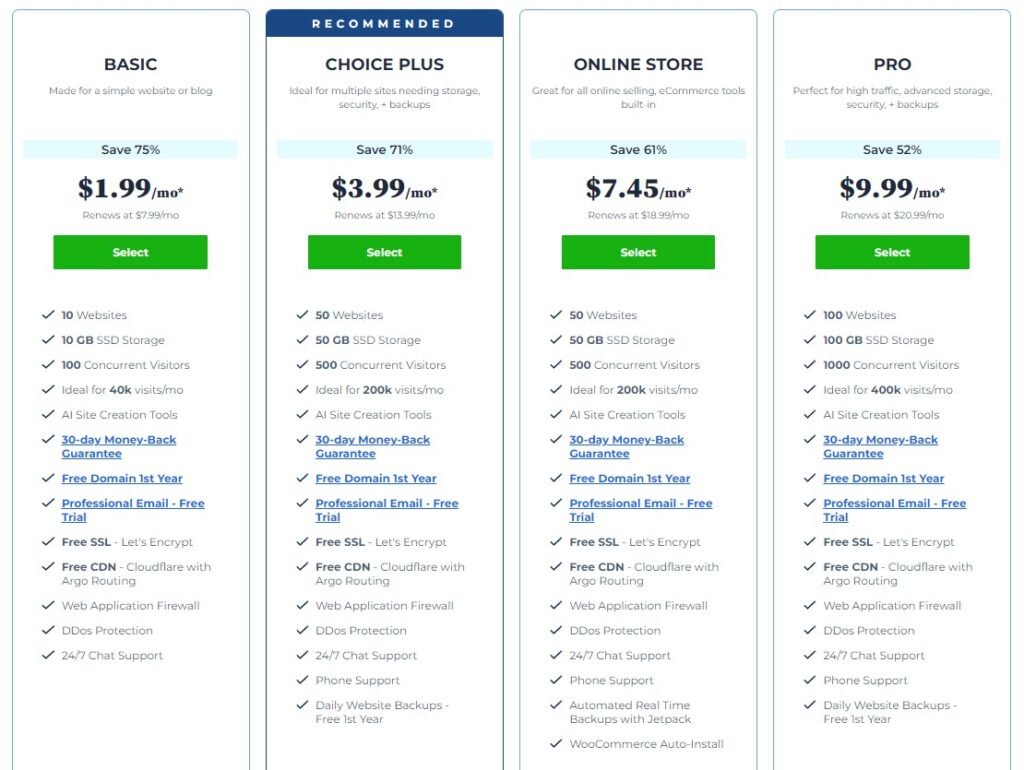
Pricing is one of the biggest factors when choosing a hosting provider. Bluehost offers multiple plans based on your needs and budget.
Bluehost Pricing Table
| Plan Type | Starting Price | Best For | Key Features |
|---|---|---|---|
| Basic Plan | Low | Beginners & small blogs | 1 website, free domain, SSL |
| Plus Plan | Medium | Growing websites | Unlimited websites, storage |
| Choice Plus | Medium | Business websites | Free backups, privacy protection |
| Pro Plan | High | High traffic websites | Better performance, dedicated IP |
Important Notes
- Introductory prices are low but renewals are higher
- Add-ons may increase total cost
- Longer plans offer better discounts
Bluehost is affordable at the start, which is why many beginners choose it.
Bluehost Performance: Speed and Uptime
Performance plays a major role in website success. A slow website can drive visitors away and affect search rankings.
Speed Performance
Bluehost offers decent speed for most websites. It uses SSD storage and integrates with CDN services to improve loading times.
Factors that affect speed:
- Server location
- Website design
- Use of caching plugins
- Traffic volume
Uptime Reliability
Uptime refers to how often your website is available online. Bluehost promises high uptime, typically around 99.9 percent.
This means:
- Your website stays online most of the time
- Downtime is minimal
- Visitors can access your site without issues
For beginners and small websites, Bluehost performance is usually reliable.
Ease of Use: Is Bluehost Beginner Friendly?
Bluehost is designed for people who have little to no experience with website building.
What Makes It Easy
- Simple dashboard
- Guided setup process
- Automatic WordPress installation
- Drag and drop website builder
Step-by-Step Experience
- Sign up and choose a plan
- Select a domain name
- Install WordPress
- Choose a theme
- Start creating content
Everything is clearly explained, which removes confusion for beginners.
Bluehost Pros and Cons
Every hosting provider has strengths and weaknesses. Here is a balanced view of Bluehost.
Pros
- Easy setup for beginners
- Affordable starting price
- Free domain and SSL
- Reliable uptime
- Strong WordPress integration
Cons
- Renewal prices are higher
- Upsells during checkout
- Basic plan has limited features
- Support response time can vary
This honest mix helps you decide if Bluehost suits your needs.
Bluehost for Different Users

Bluehost works differently depending on your goals. Here is how it fits various users.
For Bloggers
- Easy to start a blog
- Affordable plans
- Good for low to medium traffic
For Small Businesses
- Professional email hosting
- Secure website environment
- Scalable plans
For eCommerce
- Supports WooCommerce
- Handles small online stores
- May need upgrades for high traffic
For Developers
- Basic tools available
- Not ideal for highly advanced setups
Real User Experience and Feedback
User reviews give insight into real-world performance.
Positive Feedback
- Easy setup process
- Good for beginners
- Affordable initial pricing
Negative Feedback
- Higher renewal costs
- Add-ons can feel pushy
- Support can be slow at times
Most users agree that Bluehost is a good starting point, but some outgrow it as their website grows.
Bluehost vs Other Hosting Providers
Comparing Bluehost with other providers helps you make a better decision.
Comparison List
- Bluehost vs Hostinger
- Hostinger is cheaper
- Bluehost offers better brand trust
- Bluehost vs SiteGround
- SiteGround has better speed
- Bluehost is more beginner-friendly
- Bluehost vs GoDaddy
- Bluehost is easier for WordPress
- GoDaddy focuses more on domains
Is Bluehost Safe and Secure?
Security is one of the first things any website owner should think about. Whether you are running a blog, business site, or online store, protecting your data and your visitors’ information is essential. Bluehost includes several built-in security features that help keep your website safe without requiring advanced technical skills.
Core Security Features
These are the standard protections that come with most Bluehost plans.
Free SSL Certificate
Bluehost provides a free SSL certificate with every plan. This ensures that all data shared between your website and visitors is encrypted. It also adds the secure “https” label to your site, which builds trust and improves search engine rankings.
Secure Servers
Bluehost uses well-maintained servers with multiple layers of protection. These servers are monitored regularly to prevent unauthorised access, reduce risks, and maintain stability.
Malware Protection Options
Bluehost offers tools that help detect and remove malware. While some advanced protection features may come as paid add-ons, basic protection is available to keep your website safe from common threats.
Backup Features
Regular backups are important in case something goes wrong. Bluehost provides backup options so you can restore your website quickly if needed. Some plans include automatic backups, while others may require manual setup or upgrades.
Additional Safety Benefits
Beyond basic features, Bluehost also provides extra layers of protection that improve overall security.
- Protection against spam and harmful traffic
- Secure login systems for account safety
- Option to add advanced security tools
- Regular updates for better protection
These features help reduce the risk of hacking, data loss, and downtime.
What You Should Keep in Mind
While Bluehost provides strong security tools, no hosting platform is completely risk-free. Website owners should still follow basic safety practices:
Enable additional security tools if needed
Use strong passwords
Keep WordPress themes and plugins updated
Avoid installing unknown plugins
Who Should Use Bluehost?
Bluehost is ideal for:
- Beginners starting their first website
- Bloggers and content creators
- Small business owners
- Affiliate marketers
It may not be ideal for:
- High-traffic websites
- Advanced developers
- Large eCommerce stores
Final Verdict:
Bluehost is a solid option for beginners and small website owners. It offers a simple setup, affordable starting price, and reliable performance.
However, it is important to consider long-term costs and limitations. As your website grows, you may need to upgrade or switch to a more advanced hosting provider.
If you are just starting out and want a simple, trusted platform, Bluehost is a good choice. It provides everything you need to launch your website quickly and efficiently.
Must Read:
- JustDone Reviews: Can It Truly Help Writers?
- InVideo Review: Is AI Editing Really Easy?
- Hostinger Review 2026: Is It Worth It?
FAQs:
1. Is Bluehost good for beginners?
Yes, Bluehost is one of the easiest hosting platforms for beginners.
2. Does Bluehost offer a free domain?
Yes, you get a free domain for the first year.
3. Is Bluehost recommended for WordPress?
Yes, it is officially recommended by WordPress.
4. Are Bluehost renewal prices high?
Yes, renewal costs are higher than initial pricing.
5. Can Bluehost handle high traffic?
It can handle moderate traffic, but high traffic sites may need upgrades.
6. Is Bluehost worth the money?
For beginners, it offers good value and ease of use.
- Beginner friendly website hosting platform
- Free domain and SSL included
- One click WordPress installation setup
- Reliable uptime with fast loading