

- AI Voiceovers with Natural Speech
- Generate Videos from Simple Text
- Create Music and Sound Effects
- All-in-One AI Content Creation
Creating engaging YouTube videos takes much more than recording footage. Content creators need high-quality voiceovers, background music, video editing, subtitles, images, and thumbnails. Managing all these tasks with separate software can be expensive and time-consuming. This is where TopMediai aims to make a difference.
In this TopMediai Review, we'll explore whether this AI-powered platform deserves a place in your content creation workflow. From AI voice generation and video creation to music production and image generation, TopMediai combines several creative tools into one platform.
Whether you're a beginner YouTuber, experienced content creator, educator, marketer, or business owner, this guide will help you decide if TopMediai is the right investment.
What Is TopMediai?
TopMediai is an all-in-one AI content creation platform that provides multiple creative tools for generating videos, voiceovers, music, images, and other digital content. Instead of purchasing separate subscriptions for various AI applications, users can access numerous features from a single dashboard.
The platform is designed for:
- YouTube creators
- Bloggers
- Affiliate marketers
- Social media influencers
- Teachers
- Digital marketers
- Small businesses
- Podcast creators
- Freelancers
- Agencies
Unlike traditional editing software that requires technical knowledge, TopMediai focuses on simplicity. Most tools require only a text prompt, image upload, or a few clicks to generate professional-quality content.
Why YouTube Creators Need AI Tools?
YouTube has become increasingly competitive. Thousands of videos are uploaded every minute, making it essential to create high-quality content consistently.
A typical creator may spend hours on:
- Writing scripts
- Recording voiceovers
- Editing videos
- Creating thumbnails
- Designing graphics
- Adding subtitles
- Finding background music
AI tools automate many of these repetitive tasks, allowing creators to focus on producing valuable content instead of spending countless hours on editing.
This is one reason why TopMediai Review articles have become popular among YouTubers looking for affordable productivity tools.
TopMediai Features at a Glance
One of the biggest strengths highlighted in this TopMediai Review is the wide range of AI-powered tools available under one subscription.
Some of the most popular features include:
- AI Text-to-Speech
- AI Voice Cloning
- AI Song Generator
- AI Music Generator
- AI Video Generator
- AI Image Generator
- AI Avatar Creator
- AI Face Swap
- AI Subtitle Generator
- AI Voice Changer
- AI Dubbing
- AI Sound Effects
- AI Background Remover
Instead of switching between multiple websites, creators can complete most production tasks from a single workspace.
User Interface and Ease of Use
One of the first things you'll notice during this TopMediai Review is how beginner-friendly the platform feels.
The dashboard is clean, organised, and easy to navigate. Each AI tool is grouped into logical categories, making it simple to find the feature you need.
Even users with no editing experience can generate content by following straightforward steps.
Typical workflow:
- Select an AI tool.
- Enter a prompt or upload media.
- Choose preferred settings.
- Generate content.
- Download the final result.
This streamlined process significantly reduces the learning curve compared to professional editing software.
AI Text-to-Speech Review
The AI Text-to-Speech feature is one of the platform's strongest offerings.
Many YouTube creators prefer AI narration because it saves time and eliminates the need for expensive recording equipment.
With TopMediai, users can convert written scripts into realistic speech within minutes.
Key Benefits
- Natural-sounding AI voices
- Multiple languages
- Various accents
- Adjustable speed
- Adjustable pitch
- Emotion-based voices
- Fast generation
The voices sound considerably more human than older robotic text-to-speech engines.
For creators producing:
- Tutorial videos
- Product reviews
- Educational content
- Documentary videos
- Meditation videos
- Travel guides
the AI voice generator can save several hours every week.
Voice Quality
A major focus of this TopMediai Review is voice quality because it directly impacts viewer engagement.
TopMediai provides voices that sound expressive, clear, and easy to understand.
Instead of flat robotic narration, many voices include natural pauses, breathing patterns, and emotional variations.
This helps videos sound more professional without hiring voice actors.
AI Voice Cloning
Voice cloning has become one of the fastest-growing AI technologies.
TopMediai allows users to create AI versions of their own voices after uploading sample recordings.
Potential uses include:
- Narrating videos
- Audiobooks
- Podcasts
- Training materials
- Customer support
- Personal branding
Creators who frequently publish videos can maintain a consistent voice without recording every script manually.
AI Voice Changer
Another useful feature covered in this TopMediai Review is the AI Voice Changer.
Users can modify existing recordings using different voice styles.
Examples include:
- Male voices
- Female voices
- Cartoon characters
- Celebrity-inspired voices
- Anime styles
- Gaming voices
This feature is especially useful for gaming channels, entertainment creators, and storytelling videos.
AI Video Generator
Video creation is becoming increasingly AI-driven.
TopMediai's AI Video Generator enables creators to transform text prompts into engaging videos.
Instead of spending hours editing clips manually, users can generate visual content from simple descriptions.
This makes the platform suitable for:
- YouTube Shorts
- Product videos
- Marketing videos
- Educational presentations
- Promotional videos
- Social media content
The generated videos can significantly reduce production time for creators who publish frequently.
Text-to-Video Creation
One standout feature discussed in this TopMediai Review is text-to-video generation.
Users simply describe the scene they want.
For example:
“A beautiful mountain sunrise with birds flying across the sky.”
The AI generates matching visuals automatically.
This capability is especially useful when creators lack original footage or stock videos.
Image-to-Video Conversion
Another interesting feature allows users to animate static images.
This works well for:
- Historical videos
- Family slideshows
- Educational content
- Marketing campaigns
- Product showcases
Instead of displaying still photos, creators can produce dynamic visual presentations.
AI Music Generator
Music is an essential part of YouTube production.
Finding copyright-free music can be difficult, especially for monetised channels.
TopMediai includes an AI Music Generator that creates original background tracks based on user prompts.
Creators can customise music according to:
- Mood
- Genre
- Tempo
- Instruments
- Length
This reduces reliance on third-party music libraries.
AI Song Generator
Beyond background music, TopMediai also supports AI-generated songs.
Users can generate songs using:
- Lyrics
- Themes
- Music styles
- Vocal preferences
Possible genres include:
- Pop
- Rock
- Classical
- Hip-hop
- Electronic
- Country
- Cinematic
This feature appeals to musicians, advertisers, and creative YouTubers experimenting with original music.
AI Sound Effects
Many YouTube creators spend considerable time searching for sound effects.
TopMediai simplifies this process by generating AI-powered audio effects suitable for:
- Gaming videos
- Comedy videos
- Cinematic scenes
- Short films
- Animations
This helps improve production quality without purchasing expensive sound libraries.
AI Image Generator
Visual content is essential for YouTube success.
The AI Image Generator allows users to create unique artwork using text prompts.
This feature can produce:
- Thumbnails
- Illustrations
- Backgrounds
- Concept art
- Character designs
- Marketing graphics
Instead of relying on stock photography, creators can generate original visuals tailored to their content.
Thumbnail Creation
An attractive thumbnail often determines whether someone clicks on a video.
During this TopMediai Review, the image generation tool proved particularly useful for designing eye-catching thumbnails.
Creators can produce:
- Bright colours
- Cinematic lighting
- Realistic portraits
- Fantasy artwork
- Anime illustrations
- Product mock-ups
These visuals can improve click-through rates while giving channels a distinctive look.
AI Face Swap
Face Swap has become increasingly popular among entertainment creators.
TopMediai enables users to replace faces within images or videos using AI technology.
Common applications include:
- Comedy videos
- Memes
- Creative storytelling
- Social media content
- Character transformation
While entertaining, creators should always use this feature responsibly and respect copyright and privacy rights.
AI Avatar Creator
Not every creator enjoys appearing on camera.
The AI Avatar Creator allows users to create digital presenters capable of delivering scripts naturally.
This is particularly useful for:
- Educational channels
- Business presentations
- Training videos
- Explainer content
- Corporate communication
Virtual presenters can help maintain consistency while reducing production costs.
Subtitle Generation
Subtitles improve accessibility and audience retention.
Many viewers watch YouTube videos without sound, especially on mobile devices.
TopMediai automatically generates subtitles that can save creators hours of manual editing.
Benefits include:
- Better accessibility
- Improved viewer engagement
- Higher watch time
- Easier translation
- Enhanced user experience
Automatic subtitles also help videos reach audiences who speak different languages.
Performance for YouTube Workflows
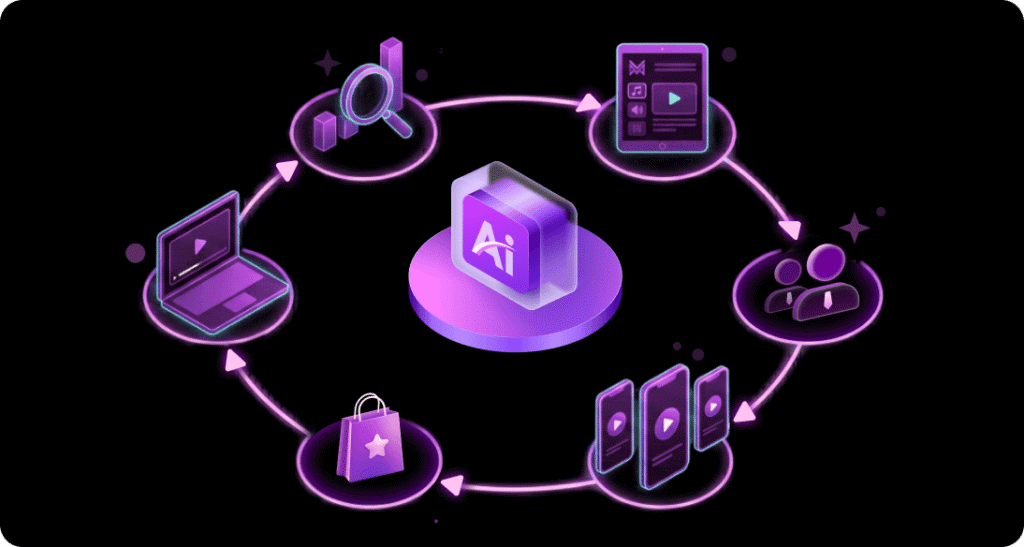
One of the biggest strengths highlighted in this TopMediai Review is how well the platform supports a complete YouTube production workflow. Rather than switching between multiple applications for voiceovers, visuals, music, subtitles, and basic editing tasks, creators can handle much of the process within a single platform.
For YouTubers who publish consistently, this streamlined approach can reduce production time and simplify content creation, especially for tutorials, reviews, educational videos, travel content, and YouTube Shorts.
TopMediai Pricing
Pricing plays a major role when choosing an AI content creation platform. One of the biggest questions people ask before subscribing is whether TopMediai offers good value compared to purchasing separate AI tools.
TopMediai provides multiple subscription options to suit different users, from beginners to professional creators. Plans and features may change over time, but the platform generally offers monthly and annual subscriptions, with annual plans providing better overall value.
Depending on your plan, you may receive access to:
- AI voice generation
- AI video creation
- AI music generation
- AI image generation
- Voice cloning
- AI avatars
- Credits for premium AI models
- Faster generation speeds
- Commercial usage rights on eligible plans
If you only create content occasionally, the entry-level plan may be sufficient. However, YouTubers who publish videos several times each week will likely benefit from a higher-tier subscription with increased monthly credits.
Is TopMediai Good Value for Money?
Throughout this TopMediai Review, one thing becomes clear: the platform offers excellent value for creators who need multiple AI tools.
Instead of paying separate subscriptions for:
- AI voice software
- AI image generator
- AI music generator
- AI video creator
- Subtitle software
- Voice changer
TopMediai combines these features into one dashboard.
For YouTube creators, this can reduce both costs and the hassle of managing several different subscriptions.
Performance and Speed
Speed is important for content creators working on tight publishing schedules.
During normal usage, most AI tools generate results within a few seconds to a few minutes, depending on:
- Content length
- AI model selected
- Server demand
- Internet connection
- Generation quality
Simple voiceovers are generally produced quickly, while AI videos and longer music compositions naturally require more processing time.
Overall, TopMediai delivers a smooth experience suitable for everyday content creation.
Content Quality
The quality of AI-generated content is one of the biggest factors influencing user satisfaction.
AI Voice Quality
Voice quality is among the strongest features offered by TopMediai.
The narration sounds:
- Natural
- Clear
- Expressive
- Professional
- Easy to understand
Many voices include realistic pauses and emotional variations, making them suitable for YouTube narration.
AI Image Quality
The AI image generator produces visually appealing artwork suitable for:
- YouTube thumbnails
- Blog illustrations
- Social media graphics
- Promotional banners
- Digital artwork
Image quality depends largely on the prompt provided. Detailed prompts generally produce better results.
AI Video Quality
The AI video generator continues to improve as new models become available. While AI-generated videos may not completely replace professional editing software for complex productions, they are well suited for:
- YouTube Shorts
- Social media clips
- Marketing videos
- Product showcases
- Educational explainers
- Creative storytelling
For many creators, these tools provide a fast way to generate engaging visual content.
Who Should Use TopMediai?
This TopMediai Review shows that the platform is suitable for a wide range of users.
YouTube Creators
Creators can use TopMediai for:
- Voiceovers
- Video generation
- Music creation
- Thumbnail design
- AI avatars
- Subtitles
It is particularly useful for channels that publish frequently.
Bloggers
Bloggers can generate:
- Featured images
- Article illustrations
- Audio versions of blog posts
- Promotional graphics
- Social media visuals
Affiliate Marketers
Affiliate marketers can create:
- Product review videos
- Comparison videos
- Promotional images
- Social media advertisements
- AI voiceovers
This makes content production faster and more scalable.
Small Businesses
Businesses can use the platform to create:
- Marketing videos
- Product demonstrations
- Training materials
- Customer support content
- Social media campaigns
Pros of TopMediai
Every TopMediai Review should highlight the platform's strongest advantages.
Multiple AI Tools in One Platform
Instead of managing several subscriptions, users can access numerous AI-powered tools from one dashboard.
Beginner-Friendly Interface
No advanced editing skills are required.
Most tools are straightforward and easy to learn.
High-Quality AI Voices
The realistic text-to-speech engine is one of the platform's biggest strengths.
Time Saving
Automation significantly reduces editing time.
This allows creators to publish more content consistently.
Regular Updates
New AI models and features are added regularly, helping users stay current with the latest AI technology.
Suitable for Multiple Industries
The platform serves creators in education, marketing, business, entertainment, blogging, and social media.
Cons of TopMediai
No platform is perfect, and this TopMediai Review would be incomplete without mentioning a few limitations.
Credit Limits
Many premium features consume credits, so heavy users may need a higher-tier plan.
Internet Required
Since the platform is cloud-based, a stable internet connection is necessary.
Learning Advanced Features
While basic tools are easy to use, advanced AI features may require some experimentation to achieve the best results.
AI Output May Need Editing
Although AI-generated content is impressive, some results may benefit from minor manual adjustments for the best quality.
TopMediai vs ElevenLabs
Many creators compare these two platforms.
| Feature | TopMediai | ElevenLabs |
|---|---|---|
| Text-to-Speech | Excellent | Excellent |
| Voice Cloning | Yes | Yes |
| AI Video | Yes | No |
| AI Images | Yes | No |
| AI Music | Yes | No |
| Multiple AI Tools | Yes | Limited |
| Best For | Complete content creation | Voice generation |
If your primary requirement is AI voice generation, ElevenLabs remains an excellent option. However, creators looking for an all-in-one platform may find TopMediai more versatile.
TopMediai vs Murf AI
Murf AI focuses primarily on professional voiceovers.
TopMediai offers:
- Voice generation
- Music
- Images
- Videos
- Avatars
- Face swap
- Subtitle generation
Creators needing a broader range of creative tools may appreciate TopMediai's wider feature set.
TopMediai vs InVideo AI
InVideo AI specialises in AI video production.
TopMediai combines video generation with additional creative tools, making it a more comprehensive solution for creators who also need voiceovers, music, and images.
Is TopMediai Safe?
Security is another common concern covered in every TopMediai Review.
TopMediai is generally considered safe to use for legitimate content creation purposes. Users should always:
- Protect their account credentials.
- Use strong passwords.
- Respect copyright laws.
- Avoid uploading confidential information.
- Follow the platform's terms of service.
As with any AI platform, it is important to review generated content before publishing to ensure it meets your quality and compliance standards.
Tips for Getting the Best Results
To maximise the platform's capabilities:
- Write detailed prompts for images and videos.
- Use clear punctuation in text-to-speech scripts.
- Test different AI voices before selecting one.
- Experiment with music styles to match your content.
- Edit AI-generated output where necessary.
- Combine AI tools with your own creativity for unique results.
- Keep your branding consistent across videos and thumbnails.
Must Read:
- Zutrix SEO Tools Review: All Features, Pricing, Pros & Cons Explained
- Holo AI Review: Can It Really Write Stories Better?
- ClickUp Review: Can It Replace All Your Work Tools?
FAQs:
Is TopMediai suitable for beginners?
Yes. The interface is user-friendly, and most tools require only a few simple steps to generate content.
Can I use TopMediai for YouTube videos?
Absolutely. The platform is well suited for creating voiceovers, thumbnails, background music, subtitles, AI-generated visuals, and short-form videos.
Does TopMediai support multiple languages?
Yes. The text-to-speech and several other AI tools support a wide range of languages and accents, making it useful for creators with international audiences.
Can I replace professional editing software with TopMediai?
For basic and intermediate projects, TopMediai can handle many tasks efficiently. However, professional editors working on highly complex productions may still prefer dedicated editing software for advanced control.
Is TopMediai worth the subscription cost?
If you regularly use multiple AI tools, a single TopMediai subscription can provide good value by combining voice, video, image, music, and other creative features in one platform.
Conclusion:
This TopMediai Review shows that the platform has evolved into much more than a simple text-to-speech tool. It now offers an impressive collection of AI-powered features that support nearly every stage of the content creation process, from generating scripts and voiceovers to creating images, music, videos, subtitles, and avatars.
Whether you run a YouTube channel, manage a blog, promote affiliate products, or create content for social media, TopMediai can help reduce production time and simplify your workflow. Its intuitive interface makes it accessible to beginners, while its expanding library of AI tools provides enough flexibility for experienced creators.
Although no AI platform can completely replace human creativity, TopMediai serves as a powerful assistant that helps creators work faster and more efficiently. If you are searching for a feature-rich, all-in-one AI solution to support your YouTube journey, TopMediai is a platform well worth considering.
- AI Voiceovers with Natural Speech
- Generate Videos from Simple Text
- Create Music and Sound Effects
- All-in-One AI Content Creation