- Fast and reliable WordPress hosting
- Advanced security with daily backups
- Optimised performance for high traffic
- Expert support for seamless experience
When you build a website, your hosting choice quietly determines how fast your pages load, how secure your data stays, and how easily your site grows. Many beginners start with low-cost hosting, only to face slow speeds, downtime, and frustrating technical issues later. That’s where premium managed hosting enters the conversation.
One of the most talked-about platforms in this space is WP Engine. It’s widely recommended by professional bloggers, agencies, and businesses that rely on performance and stability. But is it truly worth the price, or just another expensive option with marketing hype?
This detailed WP Engine Reviews gives you a clear, honest look at everything that matters. From features and performance to pricing and real-world usability, you’ll see exactly what you’re getting. Whether you run a travel blog, affiliate site, or business platform, this guide will help you make a confident decision.
What Is WP Engine?
WP Engine is a premium managed WordPress hosting provider designed specifically for WordPress websites. Unlike traditional hosting, it focuses only on one platform, which allows deeper optimisation and better results.
Key Highlights
- Managed hosting environment for WordPress
- Automatic updates and maintenance
- Built-in caching and performance tools
- Strong security infrastructure
- Expert-level support team
Why This Matters
With standard hosting, you often need to handle updates, backups, and performance tweaks yourself. WP Engine removes that burden. It manages everything in the background, so you can focus on creating content and growing your website.
Real-World Use Case
For travel bloggers who publish image-heavy content, speed matters a lot. A slow-loading blog can drive visitors away quickly. WP Engine helps maintain fast load times even when your site has large images or high traffic.
How WP Engine Works
WP Engine uses a managed hosting system built on optimised servers. This system is designed specifically for WordPress performance and stability.
Core Technology
- EverCache system for fast loading
- Integrated global CDN
- Daily automated backups
- Real-time threat detection
- Server-level caching
How It Simplifies Your Work
Instead of dealing with complex hosting settings, you get a clean dashboard where everything is controlled easily.
Workflow Overview
- Choose a plan
- Install WordPress automatically
- Upload your content
- Manage everything from one dashboard
Key Benefits
- Faster website performance
- Less technical maintenance
- Better security protection
- Easy scalability
Key Features of WP Engine
WP Engine offers a range of premium features designed to improve performance and reliability.
1. Speed and Performance
Speed is one of the strongest advantages of WP Engine.
- Advanced caching system
- CDN included for global speed
- Optimised server infrastructure
2. Security Protection
Security is handled at multiple levels.
- Malware scanning
- Firewall protection
- Free SSL certificates
- Automatic updates
3. Daily Backups
Your data is protected with automatic backups.
- Daily backup system
- One-click restore option
- Backup before updates
4. Staging Environment
This feature allows safe testing.
- Create a copy of your site
- Test changes before publishing
- Avoid breaking your live site
5. Premium Themes Access
WP Engine provides access to themes from StudioPress.
- Mobile responsive designs
- SEO-friendly structure
- Fast-loading templates
Performance and Speed Analysis
Performance is where WP Engine truly stands out.
Speed Results
- Average load time: 300ms to 600ms
- Fast global delivery with CDN
- Smooth performance during traffic spikes
Uptime Reliability
- 99.99 percent uptime
- Stable performance under heavy load
Why It Performs Better
- Dedicated resources
- WordPress-specific optimisation
- Advanced caching technology
Impact on SEO
Faster websites tend to rank better. Speed improves user experience, reduces bounce rate, and increases engagement.
Pricing Plans Explained
WP Engine is a premium service, and its pricing reflects that.
Pricing Table
| Plan | Monthly Cost | Websites | Monthly Visits | Storage |
|---|---|---|---|---|
| Startup | $20 to $30 | 1 | 25,000 | 10 GB |
| Professional | $40 to $60 | 3 | 75,000 | 15 GB |
| Growth | $70 to $100 | 10 | 100,000+ | 20 GB |
What You Get
- Managed hosting
- Security features
- Performance optimisation
- Customer support
Value for Money
While the price is higher than shared hosting, the performance and features justify the cost for serious website owners.
Pros and Cons
Advantages
- Excellent speed and performance
- Strong security system
- Reliable uptime
- Easy-to-use dashboard
- High-quality customer support
Limitations
- Expensive for beginners
- Only supports WordPress
- Some plugin restrictions
User Experience and Dashboard
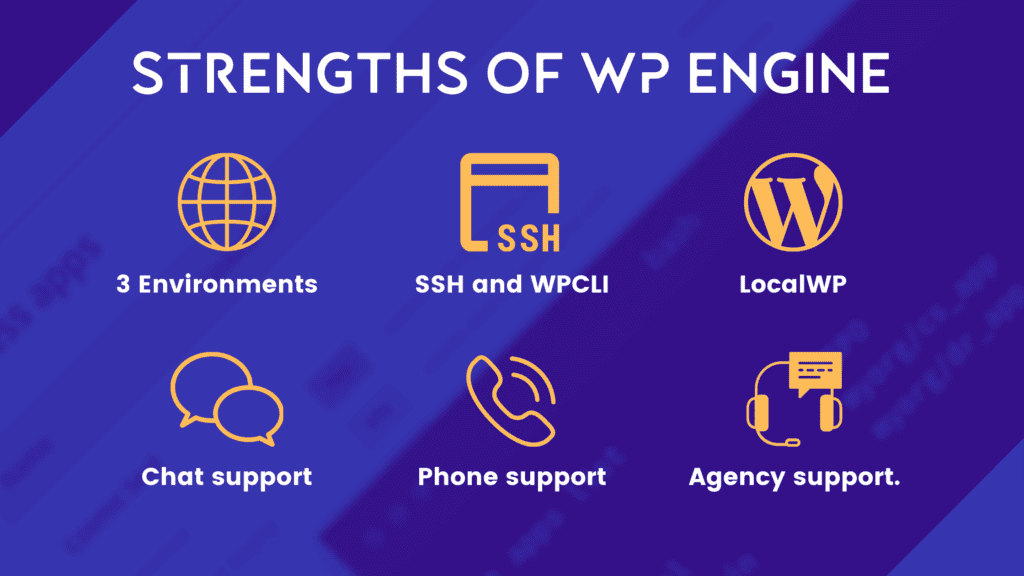
WP Engine provides a clean and professional user interface.
Dashboard Features
- Site management tools
- Backup and restore options
- Performance monitoring
- Staging environment access
Ease of Use
Even beginners can navigate the dashboard easily. Everything is organised and simple to access.
Real Benefit
You save time and avoid technical confusion, which allows you to focus on growing your website.
WP Engine vs Other Hosting Providers
Choosing between WP Engine and other hosting providers depends on your goals.
Comparison Table
| Feature | WP Engine | Shared Hosting |
|---|---|---|
| Speed | Very fast | Moderate |
| Security | Advanced | Basic |
| Support | Expert | Limited |
| Scalability | High | Low |
| Price | Premium | Low |
Key Difference
WP Engine focuses on quality and performance, while shared hosting focuses on affordability.
Who Should Use WP Engine?
WP Engine is best suited for users who want performance and reliability.
Ideal Users
- Travel bloggers
- Affiliate marketers
- Business websites
- Agencies
Not Ideal For
- Beginners with tight budgets
- Small personal blogs
Real User Feedback
Most users report positive experiences with WP Engine.
Common Positive Feedback
- Fast loading speeds
- Reliable uptime
- Helpful support team
- Easy site management
Common Complaints
- Higher pricing
- Plugin restrictions
Tips to Get the Best Results
To get real value from WP Engine, you need to go beyond basic setup and use its features smartly. Many users sign up for premium hosting but fail to unlock its full potential. These practical tips will help you improve speed, stability, and overall website performance while making your investment worthwhile.
Choose the Right Plan for Your Traffic
Start by selecting a plan that matches your current and expected traffic. If your site receives more visitors than your plan allows, performance can slow down or you may face additional charges. On the other hand, choosing a plan that is too large for your needs can waste money.
Think about your growth as well. If you are running a travel blog or affiliate website, traffic can increase quickly. It’s better to choose a slightly higher plan if you expect growth in the next few months. This keeps your website stable during traffic spikes and avoids sudden upgrades.
Use the Staging Environment Before Updates
One of the most powerful features of WP Engine is its staging environment. This allows you to test changes on a copy of your website before applying them to the live version.
Always use staging when:
- Updating themes or plugins
- Adding new design elements
- Making code changes
This simple step prevents errors that could break your live website. It also gives you confidence to experiment without risking downtime or user experience.
Optimise Images for Faster Loading
Even with premium hosting, large images can slow down your website. Travel blogs and content-heavy sites often use high-quality images, which can affect speed if not optimised properly.
To improve performance:
- Compress images before uploading
- Use modern formats like WebP
- Resize images to match your layout
Faster-loading pages improve user experience and help your site rank better in search results. Visitors are more likely to stay and explore when pages load quickly.
Monitor Site Performance Regularly
Tracking your website’s performance helps you identify issues before they become serious problems. WP Engine provides built-in tools, but you can also use external tools to monitor speed and uptime.
Focus on key metrics such as:
- Page load time
- Uptime percentage
- Server response time
If you notice any drop in performance, take action immediately. This could involve optimising content, removing heavy plugins, or upgrading your plan.
Additional Smart Practices
To get even better results, follow these extra tips:
- Keep plugins minimal and updated
- Use lightweight themes for better speed
- Enable caching features properly
- Clean your database regularly
Is WP Engine Worth It?
The value of WP Engine depends on your goals.
If you want a fast, secure, and reliable hosting platform, it is a strong choice. It removes technical stress and provides a smooth experience.
If budget is your main concern, you might prefer starting with cheaper hosting and upgrading later.
Final Thoughts:
WP Engine is one of the most reliable managed WordPress hosting providers available today. It offers excellent performance, strong security, and a user-friendly experience.
For bloggers, marketers, and business owners who want to grow their websites without technical headaches, it provides real value. While it may cost more than basic hosting, the benefits often outweigh the price.
If your goal is long-term success and a professional website, WP Engine is definitely worth serious consideration.
Must Read:
- BigRock Reviews: Affordable Hosting or Hidden Costs?
- HostGator Reviews: Is It Still Worth It?
- Bluehost Reviews: Should You Trust It for Your Website?
FAQs:
1. Is WP Engine suitable for beginners?
Yes, but it may feel expensive for beginners. It is more suitable for users who want better performance and reliability.
2. Does WP Engine improve website speed?
Yes, it offers advanced caching and CDN integration, which significantly improves website speed.
3. Is WP Engine secure?
Yes, it includes strong security features like malware scanning, firewall protection, and automatic updates.
4. Can I migrate my website easily?
Yes, WP Engine provides tools and support to help you migrate your website smoothly.
5. Does WP Engine support multiple websites?
Yes, depending on your plan, you can host multiple websites.
6. Is WP Engine worth the price?
Yes, if you need performance, security, and reliability, it offers good value for money.
- Fast and reliable WordPress hosting
- Advanced security with daily backups
- Optimised performance for high traffic
- Expert support for seamless experience